You slide a Blu-ray into an external drive, launch the app, and the film ends up on your desktop as a compact MP4 — ready for Plex, a tablet, or a travel folder.
Rip to a specific device
Choose from more than 300 presets to match the screen you will actually watch on. No guesswork about codecs or bitrates.
Extract a clean audio track
Grab dialogue or a score as MP3 or AAC without the video stream. Useful when you need a clip for a presentation or a separate listening file.
Shrink a disc for your media server
Hardware acceleration via Intel, NVIDIA, or AMD keeps the conversion fast. The resulting MKV or MP4 slots right into a library without the physical disc clutter.
Full-disc backup, step by step
Here is a reliable workflow when you want an exact copy of a commercial Blu-ray, re-wrapped into a single MKV with the main title, the original DTS track, and the forced English subtitles.
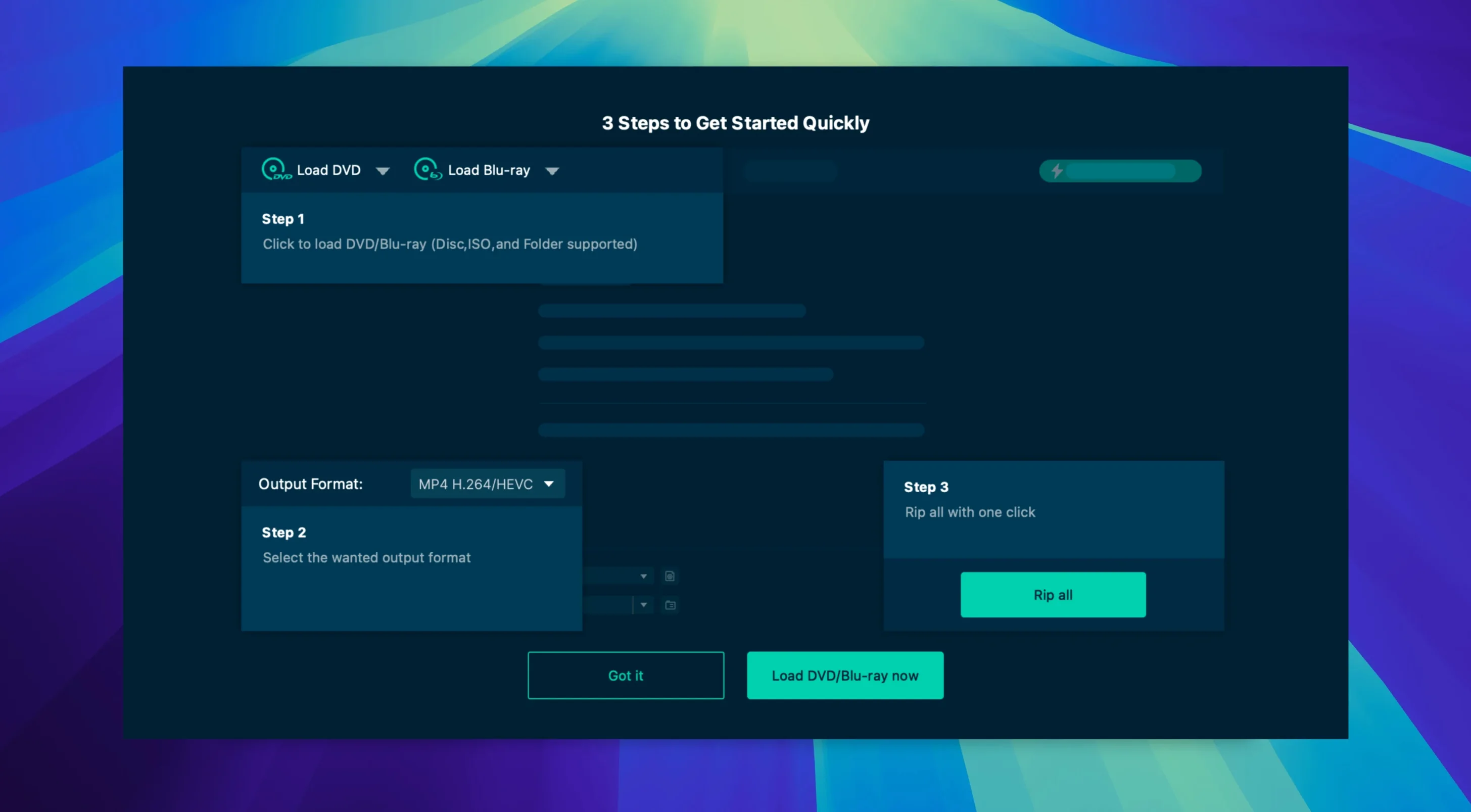
- Load the disc and let VideoByte BD-DVD Ripper scan the titles. The app strips CSS, AACS, and BD+ on the fly.
- Select Main Movie mode. The title list highlights the longest playlist — usually the feature.
- Open the audio dropdown and keep the lossless track. Uncheck commentary and descriptive audio.
- In the subtitle pane, tick English forced only. This preserves subtitles that translate alien dialogue while skipping full captions.
- Set the output profile to MKV Lossless in the format picker. The container stays transparent; no re-encode happens.
- Under the wrench icon, confirm hardware acceleration is active. On an Intel Mac, Intel Quick Sync should show as available.
- Hit Rip All. The progress bar shows the decode speed and estimated time.
- Find the MKV in your output folder and run it through your media player to verify chapters and subs.
The whole process takes roughly the playback length of the title on a modern Intel machine. If you prefer a compressed copy for a tablet, swap the profile to iPad Pro 120Hz HDR and the app handles the transcode in one pass.
Preserving HDR in a Plex-Ready MKV
Three groups see the clearest benefit.
Plex and Jellyfin users who still buy discs. The app turns a shelf of Blu-ray cases into a structured media folder without intermediate tools. Direct MKV passthrough preserves HDR metadata, which matters for 4K libraries.
Editors and educators who pull short clips from DVD sources. The trim handles on the preview pane let you mark in and out points before conversion, so you export only the forty-second segment you need. Cropping and rotation clean up letterboxing before the file reaches the timeline.
Collectors with multi-region discs. Region coding and CPRM fall away during the initial scan. A disc bought in Japan plays back as a standard file on any Mac, without switching drive regions.
Decrypts AACS and Region Locks Offline
Does it handle the copy protection I actually hit? The removal stack covers the common commercial protections — AACS, BD+, MKB, CSS, and region locks. The app does not require an internet connection to fetch decryption keys. If a disc loads in the drive and mounts on the desktop, VideoByte BD-DVD Ripper can usually parse it.
Will it run on my Mac? The build is Intel-native and works from OS X 10.10 forward. Apple Silicon Macs run it under Rosetta 2 without extra steps. If your external Blu-ray drive is USB-powered and recognised by macOS, the app sees it.
What is the difference between ripping and transcoding? Ripping decrypts and remuxes the streams into a new container — fast, lossless, and dependent on the output profile you pick. Transcoding re-encodes the video to a different codec or resolution, which takes longer but produces a smaller file. The app does both, and you control which path you take with the format and codec choices.
Can I save just one chapter? Yes. Switch to Custom Mode, expand the title tree, and tick only the chapter you need. The trim tool also lets you scrub to exact frame boundaries.
- macOS 10.10 or later
- Intel processor (Rosetta 2 on Apple Silicon)
Questions I get before install
Does it work on Apple Silicon Macs?
This 2.1.6 build is Intel (x86 64-bit); on Apple Silicon it runs through Rosetta 2.
What disc types does it handle?
It rips both Blu-ray and DVD discs. For DVD-only work there is also a separate VideoByte DVD Ripper.
Which output formats are supported?
Over 300 formats are available, including MP4, MKV, MOV, WMV, MP3, and AAC.
Comments 0
Sign in to leave a comment.Sign inCreate an account
No comments yet. If a step is still there after you install it, say so.
More in Video Converters
All in Video Converters Updated
VideoProc Converter AI
Combines video conversion, downloading, screen recording and AI upscaling in one window.
23 steps saved
 VideoProc Converter
Batch-transcodes footage from any camera or phone into an editor-friendly format.
17 steps saved
 ViWizard Spotify Music Converter
Turns Spotify tracks and playlists into standalone audio files with intact tags.
18 steps saved
 Wondershare UniConverter
Transcodes video and audio between formats and converts DVD content to common files.
11 steps saved
 Permute
Converts batches of media files to one format without repeated prompts.
9 steps saved
 Movavi Video Converter
Reshapes video, audio, and image files for a different screen or editor.
19 steps saved
 Macxvideo AI
Upscales and cleans up footage while handling format conversions in one go.
20 steps saved
 EditReady
Converts raw camera footage into edit-ready clips without the clutter of a general converter.