
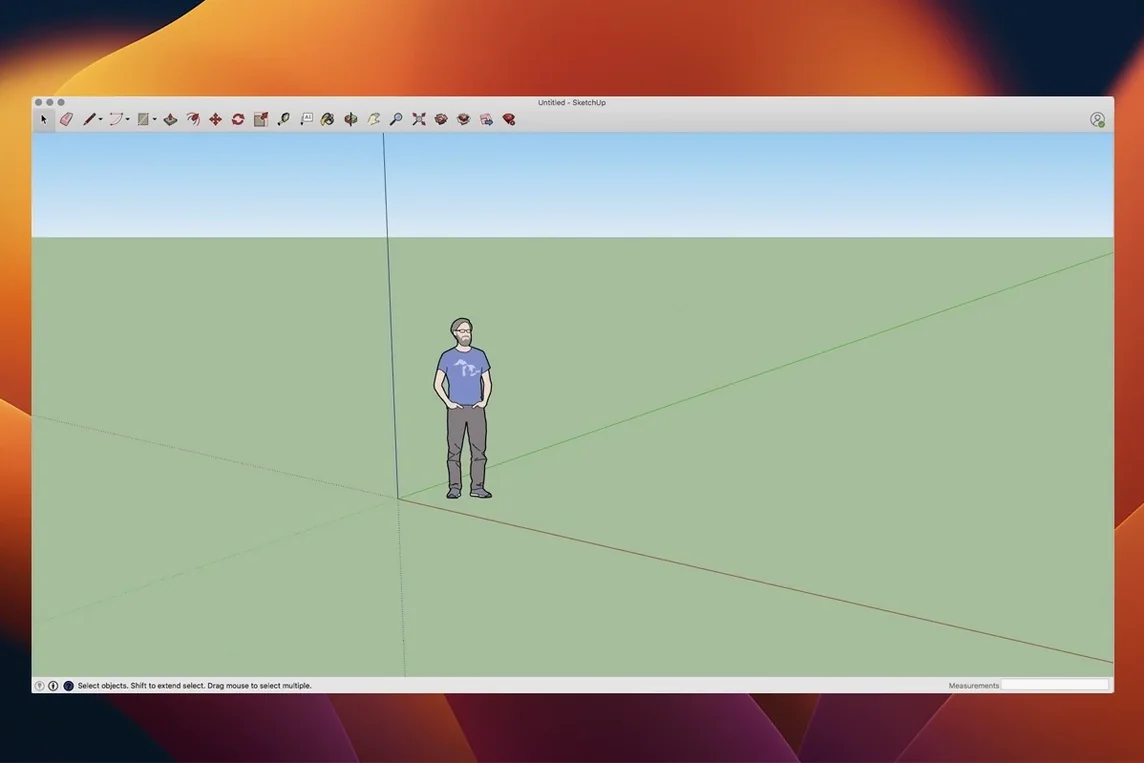
SketchUp 2026.2 ships as a proper 64-bit Mac build. It also brings LayOut graphics improvements and fixes for Mac shortcuts and interface glitches.
Model the massing
Block out the main volumes with the rectangle and Push/Pull tools. Offsets and guides keep proportions in check.
Add detail with components
Swap placeholder blocks for window and door components and apply materials to finish the model.
Document in LayOut
Send the model to LayOut. Dimensions, annotations and title blocks stay linked, so a change in the model updates every viewport on the page.
Present the Result
Turn the model into an animated walkthrough or flythrough for the client meeting. SketchUp 2026.2 runs on macOS 13 Ventura through macOS 26 Tahoe, on Intel and Apple Silicon.
Native Apple Silicon feel without Rosetta
Does SketchUp 2026.2 feel native on Apple Silicon? Yes. It runs as a 64-bit Mac build, no Rosetta translation layer. The interface responds quickly on M-series chips, and large models orbit smoothly even with shadows enabled.
Can LayOut replace a CAD sheet-set workflow? Partly. LayOut handles plans, elevations, detail callouts and multi-page presentations. It updates viewports when the model changes — a real time-saver for revisions. But it won't manage external reference chains the way dedicated BIM suites do. For a small design team producing permit sets or client presentations, it covers the bases.
What file formats come in and out? Import SKP, DWG, DXF, 3DS, DEM, and image files. Export to DWG, DXF, OBJ, 3DS, VRML, and a handful of 2D raster and vector formats. IFC export is not native; you'll need an extension for that.
Does the learning curve flatten out? The first hour is gentle. Drawing shapes and pushing them into volumes feels immediate. The challenge arrives when you need groups, components, tags, and scenes to keep a model organised. Those concepts take a deliberate morning to learn, not a frantic 20 minutes before a deadline.
From massing studies to live drawing sets
- Residential architects and designers — quick massing studies, client walkthroughs, and construction-drawing sets that stay live.
- Interior designers — space planning, millwork detailing, and material boards pulled straight from the model.
- Landscape architects — terrain from contours, planting layouts, and shadow studies for sun exposure.
- Exhibition and set designers — temporary structures that need fast visualisation and dimensioned build plans.
- Woodworkers and furniture makers — component libraries, cut lists via extensions, and exploded-view diagrams in LayOut.
Users who lean heavily on parametric modelling or complex surface continuity — think automotive or jewellery design — will find the toolset too rigid. SketchUp models are mesh-based, not NURBS.
Three kitchen layouts on one as-built model
A designer doing a kitchen renovation opens the as-built model measured on site. She groups the existing walls and locks the layer. In a new tag she blocks out three layout options, each on its own scene. The client asked for sightline comparisons, so she places the camera at seated eye level and exports a scene-by-scene walkthrough. An hour before the meeting, the client sends updated appliance dimensions. She edits the component once and every scene updates. LayOut pulls the revised plans and elevations — no re-export, no broken links. The PDF lands in the client's inbox 12 minutes later.
Lock in your unit template before drawing
- Template — pick one that matches your unit system and style palette before you draw anything. Switching later means rebuilding edge styles and scene settings.
- Shortcut assignments — the Mac shortcut fixes in 2026.2 make custom keys more reliable. Map Push/Pull, Offset, and Make Component to one-hand combos if you model all day.
- Auto-save location — point it to a folder that syncs or backs up automatically. The default is fine until you need a version from three hours ago.
- Graphics engine in LayOut — the 2026.2 improvements favour Vector rendering for crisp linework on sheet. Switch from Raster if your elevations look soft when printed.
- Inference engine — keep endpoint, midpoint, and on-face inference on. Turn off the rest if the model gets jumpy with complex geometry.
SketchUp Pro 27.0.267 has landed. Details are thin on the ground — the official release notes live on the SketchUp help site if you want the full breakdown.
- macOS 15 or later
- Apple Silicon or Intel 64-bit
Questions I get before install
Can I create animated presentations from a SketchUp model?
Yes, SketchUp Pro can turn models into animated walkthroughs and flythroughs for client presentations.
Comments 0
Sign in to leave a comment.Sign inCreate an account
No comments yet. If a step is still there after you install it, say so.
More in CAD & 3D
All in CAD & 3D Rhino
Creates mathematically precise curves and surfaces, not polygon approximations.
21 steps saved
 Sweet Home
Turns a flat floor plan into a textured, navigable 3D scene without learning CAD.
17 steps saved
 Updated
Plasticity
Shapes solids directly without a parametric history tree holding you back.
6 steps saved
 Pixologic Zbrush
Sculpts high-resolution characters and organic forms like digital clay.
23 steps saved
 TouchDesigner
Replaces text-based coding with a network of operators for real-time media.
5 steps saved
 Vectorworks
Connects 2D drawing and 3D modelling for architecture, landscape and entertainment design.
17 steps saved
 Maya
Keeps keyframing, cloth, rigging, and rendering inside a single application.
6 steps saved
 MAXON Cinema
Handles product rendering, character rigging, and walkthroughs in one package.