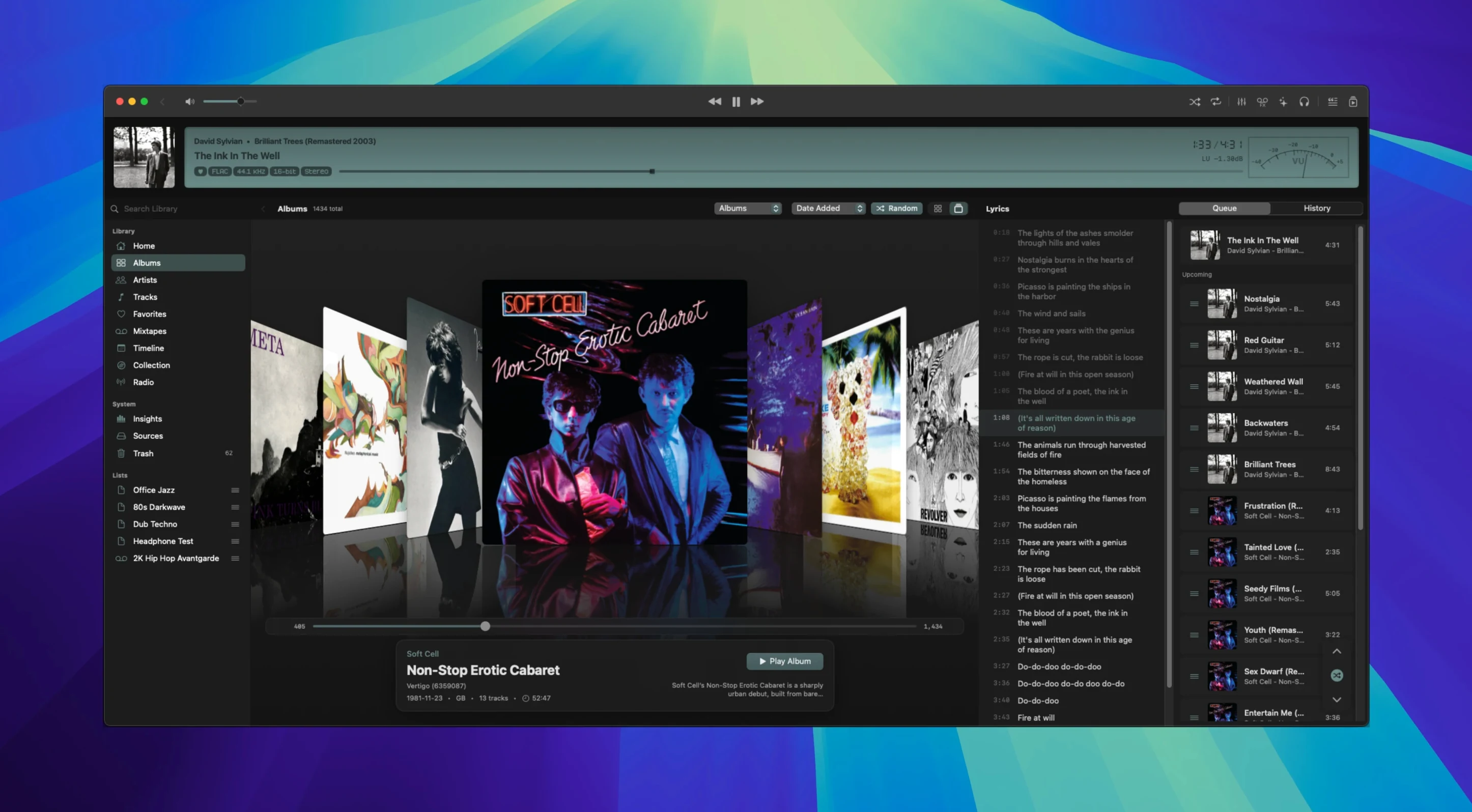
10,000 tracks. That is the point where most music apps start to stumble. Zenteek handles it as a baseline. The player indexes your library in real time, whether the files sit on your internal drive or a server share, and stays responsive while you search.
Rescuing a DSD collection
The scenario: a folder of SACD rips — DFF, DSF, and a few DST-compressed files — that another player refused to read. Here is the path we took in Zenteek:
- Point the library to the folder. Indexing began immediately, pulling metadata from the files and populating the browser without a progress bar.
- Global search found a specific Mahler cycle across three formats in under a second.
- Enabled exclusive mode to bypass CoreAudio's mixer and send a bit-perfect stream to the DAC.
- Applied a gentle low-shelf EQ cut via the DSP tools to tame a bright listening room.
- Fetched lyrics for the vocal movement through the built-in search.
What makes it fit
The player does not try to manage streaming services. It focuses on the local library, supports DoP for direct DSD playback, and puts the audio path controls — sample rate switching, exclusive mode, DSP — where you need them during a listening session. Unused audio monitors now sleep until called, so the CPU stays quiet. For a collection that took years to assemble, that matters.
Instant DSD Seeks and Cleaner DAC Handoffs
Version 1.7.2 landed two practical improvements that change daily listening. Seeking within a DSD track is now immediate—no more waiting while the player recalculates the buffer. Device switching after plugging in a different DAC is cleaner, losing fewer samples during the handoff. The main display also surfaces DSD output status directly, so you can confirm bit-perfect delivery at a glance without digging into menus.
Multi-Terabyte Libraries, Dedicated DACs, and Bit-Perfect Output
Three groups stand out. First, anyone sitting on a multi-terabyte library of high-resolution audio—FLAC, ALAC, or DSD—where indexing speed and format support are non-negotiable. Second, Mac users with a dedicated DAC who want exclusive mode and DoP without configuring a separate audio server. Third, the listener who reaches for DSP tools during playback but refuses to let the app tax the CPU. If your collection is still small and lossy, zenteek macos free alternatives exist, but this one scales differently.
- New — Direct DSD playback over DoP, including seeking and improved device switching. DSD output status, badges, and tooltips in the main display.
- Improved — Support for DFF, DSF, and DST-compressed DSD audio.
- Fixed — CPU usage reduced by putting unused audio monitors to sleep until needed.
- macOS 14 or later
- Apple Silicon or Intel Mac (64-bit)
Questions I get before install
Does Zenteek work with DSD files?
Yes. Version 1.7.2 supports DFF, DSF, and DST-compressed DSD audio, and includes direct DSD playback over DoP with seeking.
What macOS version does Zenteek require?
Zenteek requires macOS 14 (Sonoma) or later and runs natively on both Apple Silicon and Intel Macs.
Can I use Zenteek with my external DAC?
Absolutely. It supports CoreAudio and exclusive mode, allowing bit-perfect output directly to your DAC.
Comments 0
Sign in to leave a comment.Sign inCreate an account
No comments yet. If a step is still there after you install it, say so.
More in Mac Apps
All in Mac Apps Zipic
Watches a folder and compresses every image that lands there without a single click.
13 steps saved
 Wondershare Recoverit
Recovers files from drives that no longer mount in macOS, including lost partitions.
5 steps saved
 Wondershare Filmora
Trims clips, straightens horizons, and adds text overlays on a simple timeline.
4 steps saved
 Updated
Wirecast Pro
Replaces a hardware switcher with a software control room for live video production.
5 steps saved
 Wipr
Strips ads, trackers, and cookie popups from Safari pages before they download.
19 steps saved
 WinZip Mac Pro
Shrinks files, locks them with encryption, and gets them where they need to go.
4 steps saved
 Updated
Wins
Arranges and snaps application windows into layouts without dragging edges pixel by pixel.
10 steps saved
 Winclone Pro
Backs up only the blocks that changed in your Windows partition for faster, smaller snapshots.