
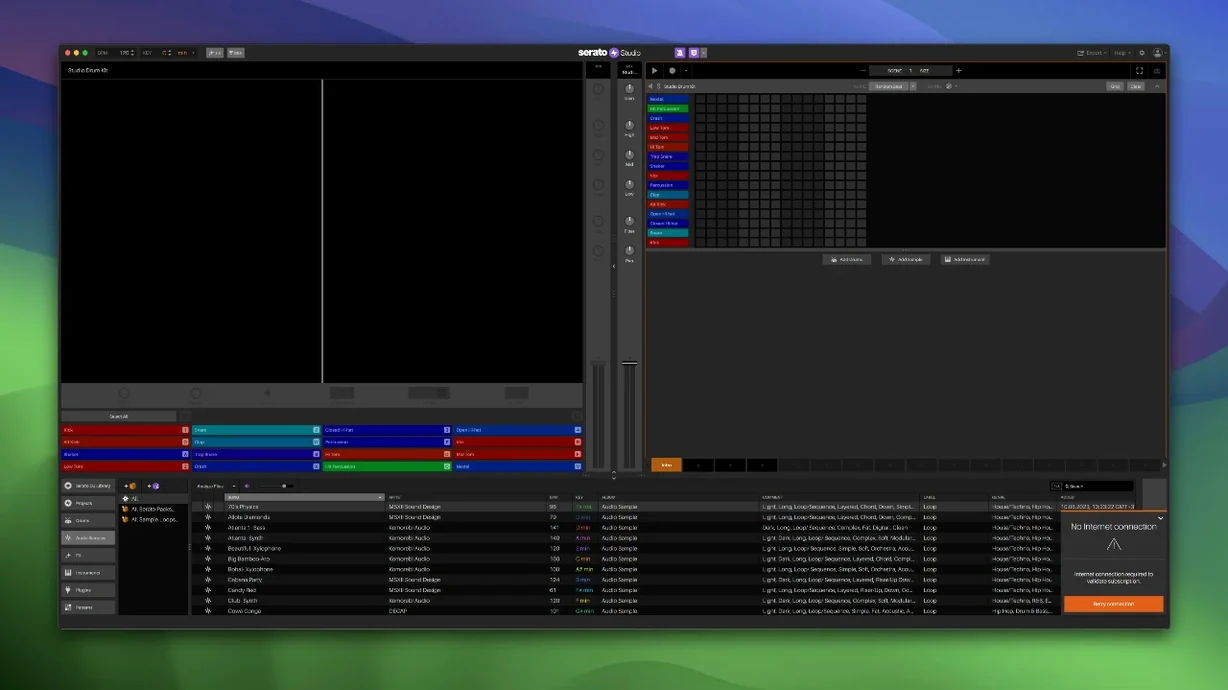
DJs who want to move from mixing tracks to making them. Producers who think in stems and cue points instead of piano rolls. That is who Serato Studio is for. It is a beat-making application built around a DJ's workflow, not a traditional linear DAW.
Drag stems into Logic Pro, not the other way around
Serato Studio opens next to your existing toolkit without pushing anything out. Export stems and drag them into Logic Pro for a final mix. Route audio into a podcast recording with Loopback. Pull drum hits from the built-in kits and layer them over a video edit in Final Cut Pro. The colour-coded waveforms and mixer channel make sense to anyone who has spent time in Serato DJ. A producer can adjust acapella, melody, bassline, and drum stem levels individually in a Sample Deck, then automate the whole thing in Scene View. It is a production environment that treats a track the way a DJ treats a record.
Tools that save time
The Feel control imitates a live keyboard player, adding subtle timing shifts to programmed parts. Automation covers Stems On/Off and individual stem levels, so an arrangement can breathe. Version 2.5.0 adds native control for the AlphaTheta SLAB and full support for macOS 26 Tahoe. The built-in drum kits, instruments, loops, and samples mean you can start a beat before hunting for sounds. For a DJ, the Reverse Pad Order option on the setup screen is a small but telling detail—it keeps the hardware layout consistent with performance muscle memory.
Audio recording into the timeline does not exist
New users sometimes expect Studio to behave like a full linear DAW. It does not. Audio recording into the timeline is not a thing here—work with samples or drag stems out to Logic Pro for that. Another early trip-up: the library can feel empty until you point it at an existing Serato DJ crate. The app shares that library, so if your files live on an external drive, reconnect it before launching. On Apple Silicon machines, a handful of older third-party AU plugins may not appear. Running Studio in Rosetta usually sorts that. If Stem separation sounds thin, check that the source file is a high-quality stereo mix. Mp3 rips at low bitrates give the algorithm very little to work with.
Right-click a waveform to set a cue point instantly
- Right-click a Sample Deck waveform to set a cue point without switching tools. The same menu lets you chop a loop to pads in one move.
- Hold Shift while turning a knob on a DJ controller mapped to Studio. The adjustment slows down for fine-tuning, useful on filter sweeps and Stem level faders.
- Auto Chord mode generates progressions in the project key, but drag a chord from the on-screen keyboard to a pad and it becomes a one-shot you can re-trigger rhythmically.
- Colour-coded waveforms reflect the same frequency colouring as Serato DJ. Bass is red, mids are green, highs are blue. Spotting a muddy mix becomes faster when you know the code.
- Favorite Crates and Crate Search arrived in the 2.5.0 library update. Tag a crate as favourite with a right-click, then filter the browser by typing two characters. It beats scrolling through dozens of folders.
Keyboard shortcuts stay out of the way until you want them. Tab toggles between Scene View and the mixer. Numbers 1 through 8 trigger pads when the Sample Deck is in focus. The Reverse Pad Order setting on the setup screen keeps your controller pads mapped the way your fingers expect—DJs who perform with Serato DJ hardware notice this immediately. If you grabbed a Serato DJ Mac torrent or a Serato Studio torrent to try the app, these tweaks make the first session feel less like guesswork.
- New — Native control for AlphaTheta SLAB. Individual stem level adjustment for acapella, melody, bassline, and drum stems in Sample Decks. Automation for Stems On/Off and individual stem levels in Sample Decks. Support for macOS 26 Tahoe.
- macOS 10.14 or later
- Intel or Apple Silicon Mac
Questions I get before install
Can I adjust individual parts of a track in Serato Studio?
Yes. Stems levels for acapella, melody, bassline, and drum parts can be adjusted individually in any Sample Deck, and those changes are automatable.
Comments 0
Sign in to leave a comment.Sign inCreate an account
No comments yet. If a step is still there after you install it, say so.
More in Mac Apps
All in Mac Apps Updated
Serato DJ Pro
Mixes tracks live with controllers, effects and smart key matching.
10 steps saved
 Sensei
Monitors hardware health, performance, and storage directly from the menu bar.
19 steps saved
 Shadowrocket
Routes your Mac's network requests through different proxies based on custom rules.
22 steps saved
 Updated
Screens 5
Lets you reach and arrange remote screens through Siri, Shortcuts, or the menu bar.
19 steps saved
 Shottr
Floats a fast, local markup tool over your screen without switching contexts.
5 steps saved
 ScreenFlow
Records the screen and supplies editing tools to turn a raw take into a finished video.
19 steps saved
 Updated
Screen Studio
Records your screen and gives you editing tools to finish the take in one app.
15 steps saved
 Sketch
Moves a design from a blank artboard to reusable, scalable components.