
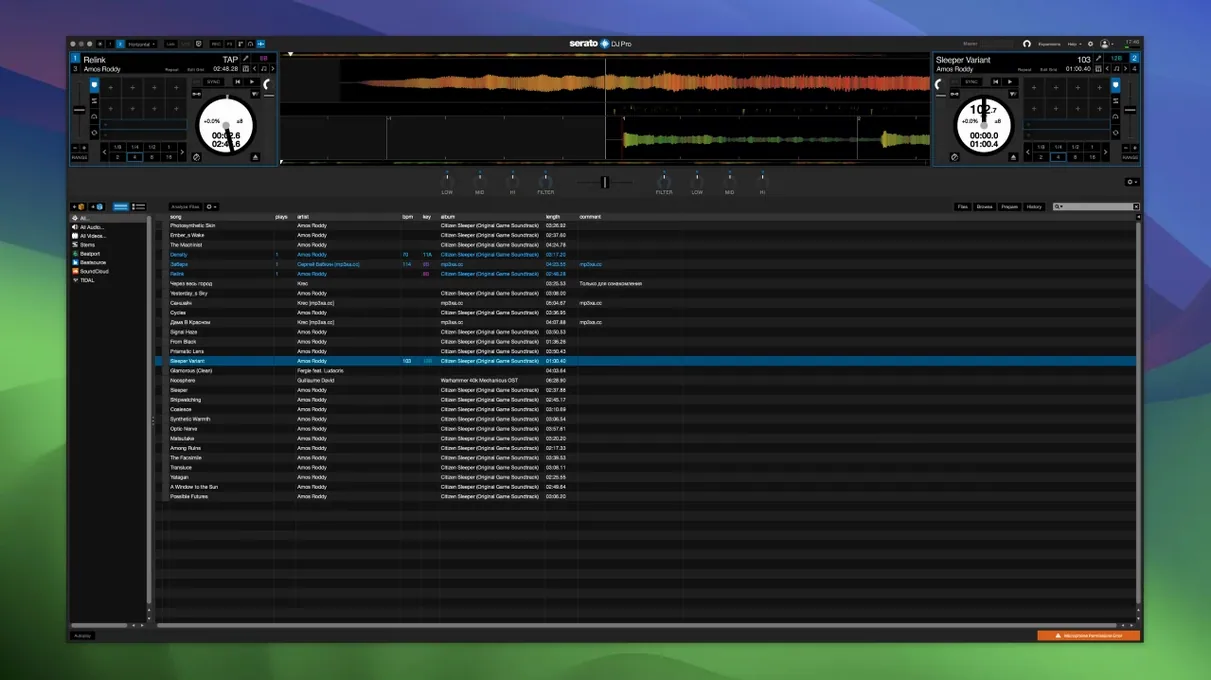
If you colour-grade video in DaVinci Resolve, you know the relief of a tool that does one demanding job without fuss. Serato DJ Pro occupies a similar place for performing DJs. It is the core of the Serato suite, built for mixing and live performance, and it runs with a kind of steady predictability that matters when a floor is full.
One real task: stripping a track for a live blend
You load a vocal house track in a packed club. The energy is right, but the mix needs a shift. Here is the sequence Serato DJ Pro handles:
- Isolate the acapella with one press of the Stems button.
- Cut the bass from the incoming track while the vocal plays solo.
- Apply a built-in FX sweep to the melody as you bring the drums back.
- Crossfade into the full instrumental of the new track.
Why Stems changes the workflow
Serato Stems controls let you separate any track into four parts — vocals, melody, bass, or drums — in real time. Creating an acapella or an instrumental is no longer a preparation step you handle in a DAW before the gig. You do it during the performance, on the fly, with the same hardware you already use. The feature is native to the software, not a plug-in you bolt on later.
A Stems workflow from crate to crossfade
Most DJs prepare crates at home, then perform. Stems encourages a different order. Here is one workflow that takes a fresh download from analysis to a clean blend in about three minutes.
You drop a new track into a crate while Serato DJ Pro analyses it. The waveform builds on screen. Instead of setting cue points first, you press the Stems button and solo the vocal. You listen for eight bars, then solo the drums. You mark a cue where the drum break is clean and another where the vocal finishes its phrase. You repeat the process for melody and bass, storing four colour-coded cues on the track — one per stem element. No DAW, no export, no duplicate files. When the track loads during a set, those cues sit on the waveform like bookmarks, and the Stems pads let you mute or isolate any element instantly. You crossfade not between whole tracks, but between the bassline of one and the vocal of another.
Customise Jog Wheel Snaps with Slip Release
A handful of Serato DJ Pro shortcuts do heavy lifting but stay out of the spotlight.
Slip Release on hardware — customisable per controller, this parameter controls how fast a track snaps back after you release a jog wheel. A short release suits scratching; a longer release suits beatmatching on jogless platters. You adjust it once per deck type and the setting persists.
Stems Pad FX — Echoes and Brakers are not just colour. Brakers applied to the vocal stem drops the vocal into a stuttering tape-stop while the drums continue unaffected. Echoes on the melody decays the synth line across two bars without muddying the bass. Both operate per stem, not per channel, so the rest of the track plays straight.
Silent crate scanning — holding Shift while loading a crate skips playback of the highlighted track. Useful when you are cueing through a folder during a set and do not want the booth monitor to leak a preview.
How a mobile DJ uses it in practice
A wedding DJ arrives with a controller, a laptop, and a Serato DJ Pro library built over three years. The couple requested a first dance track that shifts from an acoustic cover into an upbeat original halfway through — a version that does not exist as a single file.
She loads the acoustic cover on Deck A and the original on Deck B. She isolates the vocal and guitar from Deck A using Stems, cuts the bass on Deck B, and starts both tracks locked with Sync. At the transition point, she fades Deck A’s instrumental stems down while Deck B’s drums and bass come up under the same vocal. The vocal from Deck A rides across the change uninterrupted because it was never muted. She records the set directly in the software, saves the file, and hands the couple a clean recording before the night ends. No post-production, no separate recorder, no re-creation of a moment that already worked live.
What's new in 5.0
New
- Lucid Beatgrids engine. More accurate downbeat detection and automatic tempo-change tracking.
- BPM on waveform. BPM values now appear directly on the waveform where the tempo shifts.
- Grid precision controls. Set tempo changes by bar or by individual beat.
- Set Grid Start and Set Beat / Set Bar tools. Manually adjust grid start points and single beats.
- Cue Loops. Trigger a Cue point and a loop simultaneously.
- Open Streaming support. Use multiple streaming music services at once.
- Serato iOS Transfer. Move tracks, playlists, Cue points, beat grids, and metadata to Serato DJ for iOS.
- Library protection, M3U import, and reset-played-tracks button.
- Explicit column. Flags age-restricted content in your library.
- Column management. Hide Status and Type columns; control column visibility per crate.
Improved
- BPM and key display for Tidal and SoundCloud tracks when the service provides the data.
- Save tracks from supported streaming services to Favourites via the context menu.
- Updated drivers for select Pioneer DJ hardware on macOS Tahoe.
- Overall performance, large-library search speed, and app launch time.
Fixed
- Crashes, memory leaks, and interface bugs across track loading, hardware connection, and streaming services.
- Issues with stem separation, loop playback, Cue point management, and metadata handling.
macOS Big Sur 11 and earlier are no longer supported.
- macOS 12 or later
- Apple Silicon or Intel 64-bit
Comments 0
Sign in to leave a comment.Sign inCreate an account
No comments yet. If a step is still there after you install it, say so.
More in Mac Apps
All in Mac Apps Sensei
Monitors hardware health, performance, and storage directly from the menu bar.
22 steps saved
 Updated
Screens 5
Lets you reach and arrange remote screens through Siri, Shortcuts, or the menu bar.
17 steps saved
 Serato Studio
Turns a DJ workflow into a beat-making environment built around stems and cue points.
5 steps saved
 ScreenFlow
Records the screen and supplies editing tools to turn a raw take into a finished video.
19 steps saved
 Updated
Screen Studio
Records your screen and gives you editing tools to finish the take in one app.
19 steps saved
 Shadowrocket
Routes your Mac's network requests through different proxies based on custom rules.
19 steps saved
 Shottr
Floats a fast, local markup tool over your screen without switching contexts.
15 steps saved
 Sketch
Moves a design from a blank artboard to reusable, scalable components.