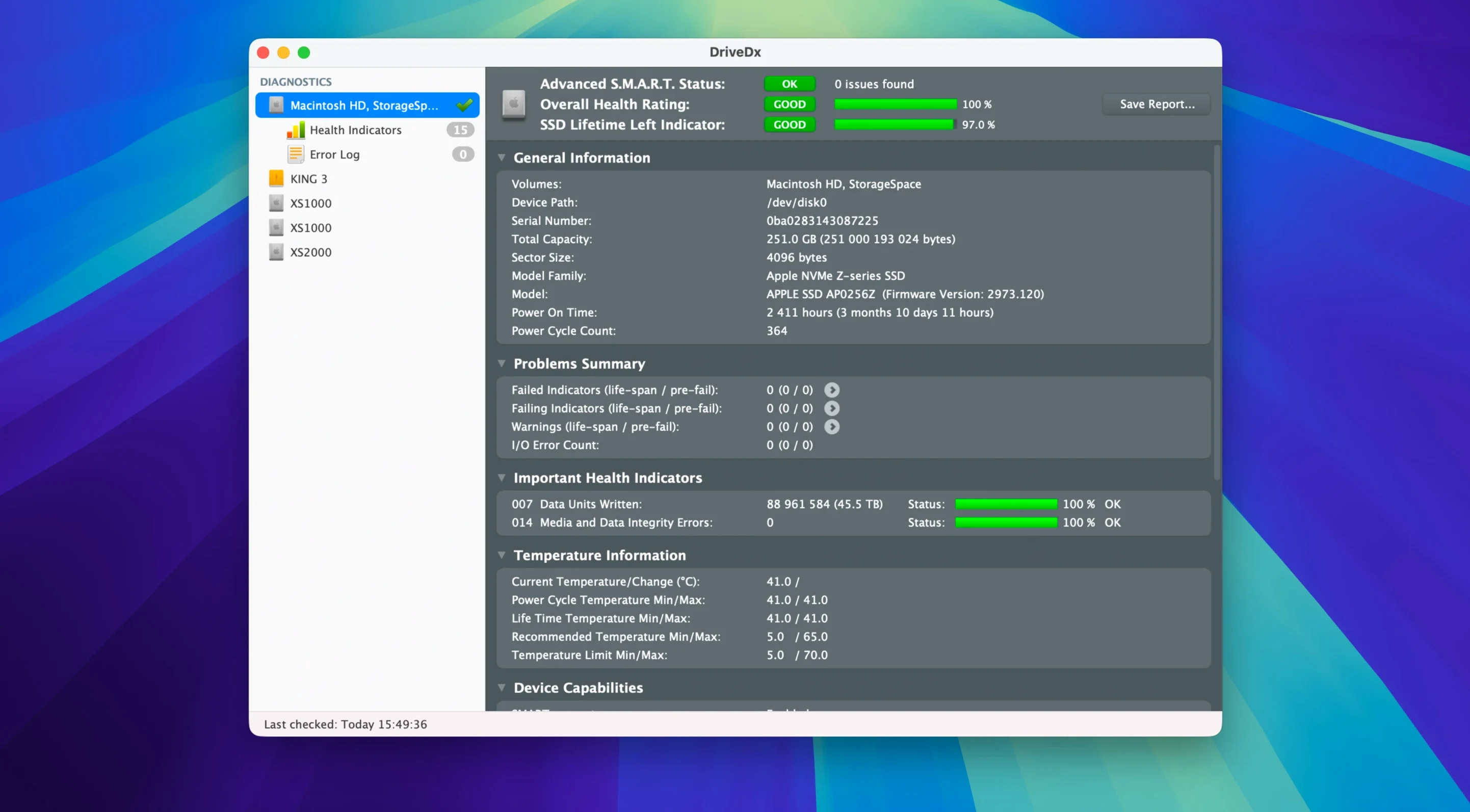
DriveDx is a diagnostic utility that reads the full SMART data from your solid-state and hard drives, translating raw health indicators into clear warnings before you lose data.
What It Monitors
- Pre-fail indicators — catches drives slipping from OK to a warning state, not just the final fail flag macOS sees.
- Background checks — runs periodic health scans while you work and pushes a notification the moment a problem appears.
- Drive heuristics — the latest diagnostic algorithms in version 1.12.1 refine how the app scores health across SSD and HDD models, including improved support for Patriot P200 SSDs.
How It Alerts You
The app distinguishes four health states — OK, Warning, Failing, and Failed — instead of a binary good-or-dead reading. When a drive enters a warning state, DriveDx can notify you immediately, giving you time to back up and replace the drive on your schedule, not the drive’s.
Where DriveDx Fits in Your Toolbox
DriveDx isn't a repair utility. It works best as the early-warning layer that sits between your daily work and the moment hardware starts to deteriorate.
Pair it with Time Machine or a cloning tool like Carbon Copy Cloner. When DriveDx flags a warning state, you already know where your backup lives and how current it is. That turns a drive alert from a scramble into a quick verification step.
The app also complements Disk Utility. Use Disk Utility to format or partition. Use DriveDx to decide when to act. If Disk Utility’s First Aid reports a clean file system but performance feels sluggish, DriveDx’s raw SMART readouts often surface the physical cause — reallocated sectors on an HDD, or a declining wear levelling count on an SSD.
The notification hooks tie into macOS’s built-in Notification Centre. A failing drive alert can appear on your Mac, your phone, and your watch without any extra configuration. Version 1.12.1 tightens the notification thresholds so you’re not chasing false alarms.
Right-Click Quick Tests and Temperature Tracking
- Self-tests on demand. Right-click any drive in the main list and choose a short or full self-test. The short test runs in under two minutes and gives a quick electrical and mechanical snapshot.
- Temperature history. The drive details panel keeps a running temperature log. A sudden climb of 10–15 °C across a few days, even if the drive stays inside spec, often signals airflow trouble before SMART flags anything.
- Exportable reports. Press
⌘Sto save a full health report as a text file. Useful when you’re emailing a sysadmin, a repair shop, or just want a dated record before a drive gets pulled. - Dock-free monitoring. DriveDx lives in the menu bar. The icon changes colour — green, orange, red — reflecting the worst health state across all connected drives. A glance tells you whether the whole system is clean.
- Silent launches. The version 1.12.1 driver installer skips Rosetta 2 entirely on Apple Silicon. That means one less background translation layer when the app starts its monitoring service.
Silent Health Drop on an 18-Month-Old Thunderbolt SSD
Megan cuts 4K projects from an external Thunderbolt SSD, the same one she’s used for eighteen months. She keeps a nightly backup, but drive health isn’t something she thinks about. She installs DriveDx and forgets it.
Three weeks later, the menu bar icon turns orange. The drive’s warning state was triggered by a slowly rising count of uncorrectable I/O errors — not enough to corrupt a file yet, but climbing. She opens the app, checks the temperature log (steady) and the wear indicator (still green), and decides the enclosure cable might be the culprit. A quick swap confirms it: errors flatline. The drive itself is fine.
Without DriveDx, the first sign would have been a dropped frame during export, a beachball in the timeline, and a frantic evening of troubleshooting. Instead, she fixed the real problem during a coffee break.
- New — Ready for macOS Sonoma. The driver installer no longer requires Rosetta 2.
- Improved — Drive diagnostic algorithms and heuristics refined for more accurate health scoring. Support for Patriot P200 SSDs updated.
- Fixed — Drive health change notification thresholds adjusted for fewer false positives.
- macOS 10.9 Mavericks or later
- Intel or Apple Silicon Mac
Questions I get before install
Does DriveDx check drive health automatically?
Yes. You can configure it to run periodic background checks and send notifications when it detects a warning or failing state.
What drive types does DriveDx support?
DriveDx monitors both hard disk drives and solid-state drives over SMART. Version 1.12.1 specifically improves support for Patriot P200 SSDs.
Comments 0
Sign in to leave a comment.Sign inCreate an account
No comments yet. If a step is still there after you install it, say so.
More in Mac Apps
All in Mac Apps Dropover
Stages scattered files on a floating shelf until you reach the destination folder.
18 steps saved
 Drama
Turns a static screen design into a clickable prototype on a single canvas.
11 steps saved
 Updated
Duplicate File Finder Pro
Finds exact file copies by content, not name, across your Mac and external drives.
11 steps saved
 Dorico Pro
Engraves scores and parts with the precision a professional publisher expects.
6 steps saved
 DxO PhotoLab
Corrects lens flaws and noise with lab-measured profiles built into the raw editor.
4 steps saved
 Dynamic Wallpaper Engine
Replaces a static desktop with live wallpapers you switch via hotkey.
11 steps saved
 DynamicLake Pro
Surfaces your next meeting and local weather in a glanceable menu-bar strip.
13 steps saved
 Disk Drill
Recovers lost files from a disk that macOS wants to reinitialize.