
Version 6.5 runs on macOS 27 Golden Gate and replaces the old kernel-extension engine with a new filtering core. What you control, and how:
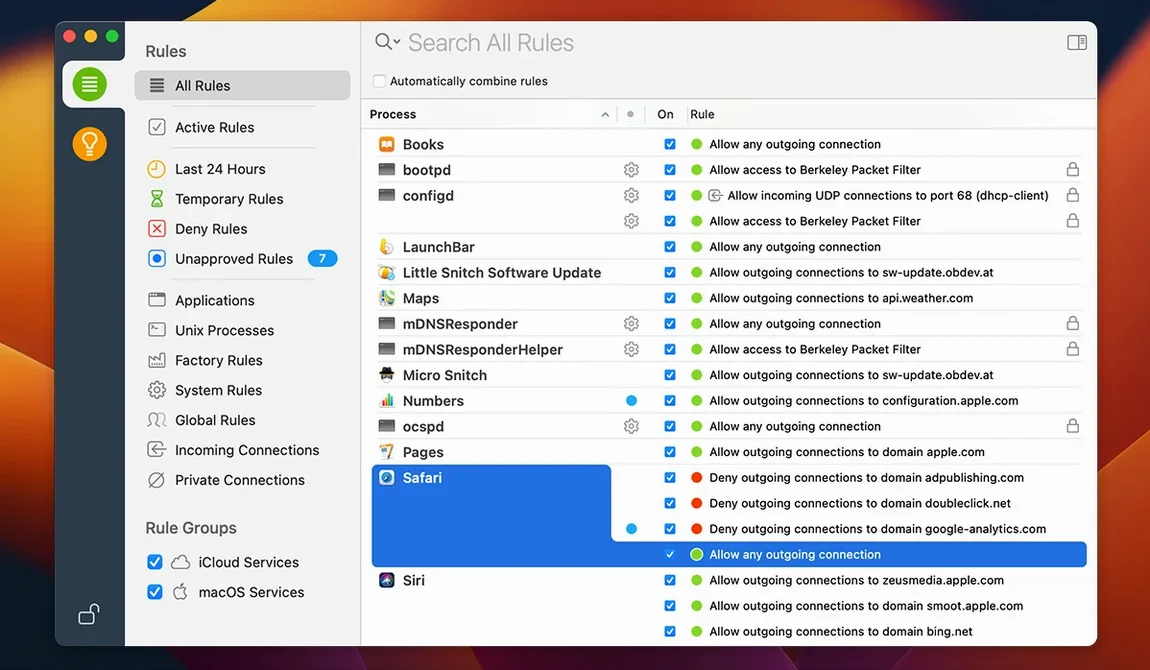
Connection Alerts — A dialog appears the moment any app tries to reach a server. You decide: allow once, deny, or build a permanent rule. No silent data leaks.
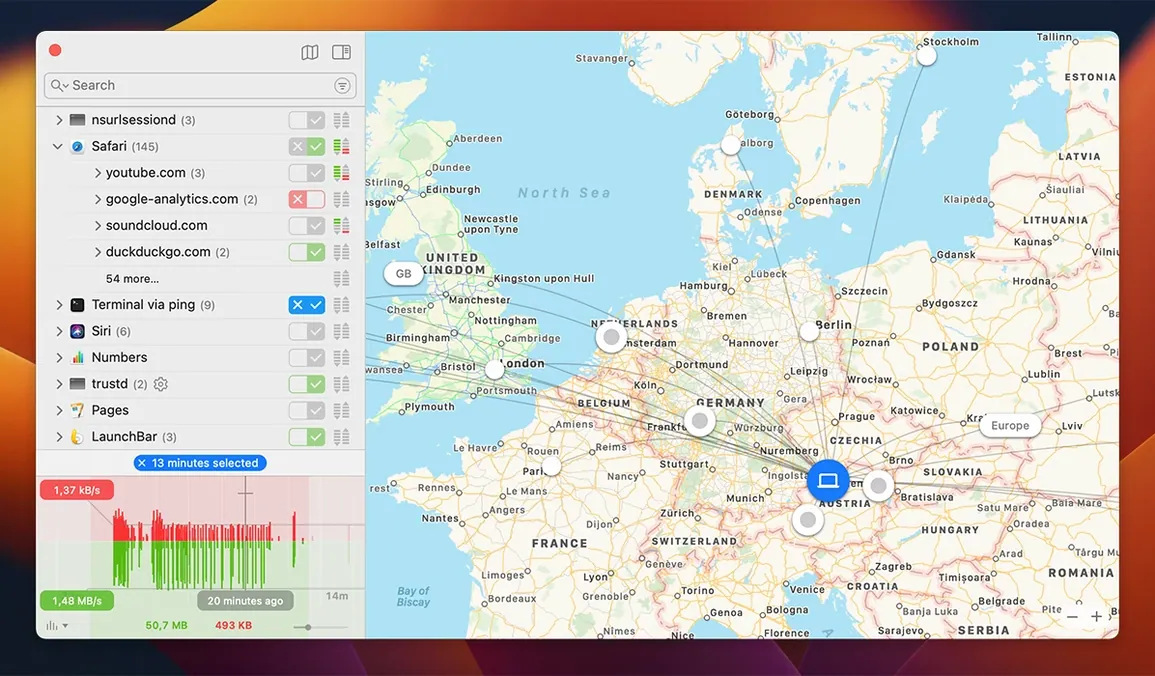
Interactive World Map — Every remote server your Mac contacts pins to a map. Spot unexpected geography at a glance. Click a pin to see the owning app and traffic volume.
Network Monitor — A live list of all active connections, sorted by process, port, and protocol. Filter by app to isolate what a single tool is doing right now.
Rule Management — Temporary rules that expire now surface properly under Suggestions. Exact-match process search no longer triggers a rare crash. Traffic labels read “volume” for clarity.
Encrypted DNS Handling — Improved in this release, so rules apply cleanly even when DNS queries are wrapped in encryption.
Alert Floods After a macOS Update
Even a well-tuned firewall hits friction. These are the three tripwires I see most often during client setups.
Alert flood after a macOS update. The new filtering engine in version 6.5 may trigger fresh connection prompts for apps that previously had standing rules — especially if those rules were tied to the old kernel extension. The fix: open Little Snitch Configuration, sort by Last Match, and delete any greyed-out rules that reference the legacy engine. Then rebuild the permanent rules from the alert queue.
Quiet Mode backlog. Users who leave Quiet Mode on for days return to a wall of pending decisions. Instead of processing them one by one, group decisions by app: filter the Network Monitor to a single process, check its usual destinations on the map, then allow or deny its traffic in bulk from the rule editor.
NAT64 confusion in IPv6-only networks. The experimental NAT64 support in version 6.5 helps Macs on networks without public IPv4. If an app suddenly cannot reach a server, open Network Monitor and look for connections labelled with a 64:ff9b:: prefix — those are synthesized IPv6 addresses. A deny rule covering the original IPv4 address may not match the synthesized one. Duplicate the rule for the IPv6 range or widen the scope to the hostname.
Bundle integrity warnings. Version 6.5 monitors an app's code signature while it runs. If a trusted app suddenly triggers a new alert, check whether it auto-updated in the background. The bundle hash changed, so Little Snitch treats it as a new unknown. Re-allow it once and the rule sticks.
Encrypted DNS Rules Now Stay Put
The shift from kernel extension to the new filtering engine is the architectural headline, but three subtler changes in version 6.5 reshape daily habits.
- Encrypted DNS rules now hold. Earlier builds could miss a DNS query wrapped in TLS or HTTPS, so a block rule for a tracking domain might leak. The improved handling means rules fire before the encrypted resolver gets the query. Set a deny rule for
*.doubleclick.netand it catches it regardless of DNS transport. - Traffic volume, not traffic amount. The label change is small, but it aligns with how the command-line tool reports data. Scripts that parse Network Monitor output should update their field references.
- Expired rules behave. Temporary rules that expired no longer vanish from the Suggestions pane. Review them under Suggestions > Expired to see what your Mac was doing last week — useful for auditing short-lived debug tools or one-off installers.
A Sysadmin’s Thursday Afternoon
Marta runs IT for a 12-person design studio. Three freelancers share a Mac Mini for rendering jobs, and the machine kept phoning home to a metrics service nobody remembered approving.
She opens the Network Monitor, filters by the render process, and maps its connections. Pins cluster in Frankfurt — the render engine’s licensing server. But one persistent connection points to a colocation host in Ashburn, Virginia, with no obvious business purpose. She right-clicks the connection, chooses Create Rule, and denies it permanently for that process. The alert queue drops to zero.
Next, she switches to the command-line tool. A quick little snitch --dump-rules exports the full ruleset to a text file, which she drops into the studio’s configuration repo. The next time a Mac is reprovisioned, the rules deploy alongside the design software — no manual clicking through alerts on each machine. The whole audit takes twelve minutes.
- New — Compatibility with macOS 27 Golden Gate. Experimental NAT64 implementation.
- Improved — Encrypted DNS handling. App bundle integrity monitored while running.
- macOS 14 or later
- Apple Silicon or Intel Mac
- Interface languages: English, German
Comments 0
Sign in to leave a comment.Sign inCreate an account
No comments yet. If a step is still there after you install it, say so.
More in Mac Apps
All in Mac Apps LilyView
Opens images straight from folders in a chromeless window that stays out of your way.
16 steps saved
 Logic Pro
Puts a full studio of instruments, loops and mixing tools into one Mac app.
10 steps saved
 LightBurn
Designs artwork and controls laser cutters from a single layout, editing, and output tool.
15 steps saved
 Loop Mash Up Pro
Triggers loops and samples alongside Logic Pro without touching the arrangement.
21 steps saved
 Updated
Loopback
Routes audio between any apps and devices on your Mac without cables.
12 steps saved
 Luminar Neo
Edits photos with layers and AI tools for sky, light and object removal.
6 steps saved
 LaunchOS
Replaces the default app launcher with a grid you arrange on your own terms.
6 steps saved
 LanScan
Scans every active network interface and lists connected devices automatically.