LightBurn 2.0.05 runs on macOS 11 and later on Intel Macs, and on Apple Silicon via Rosetta.
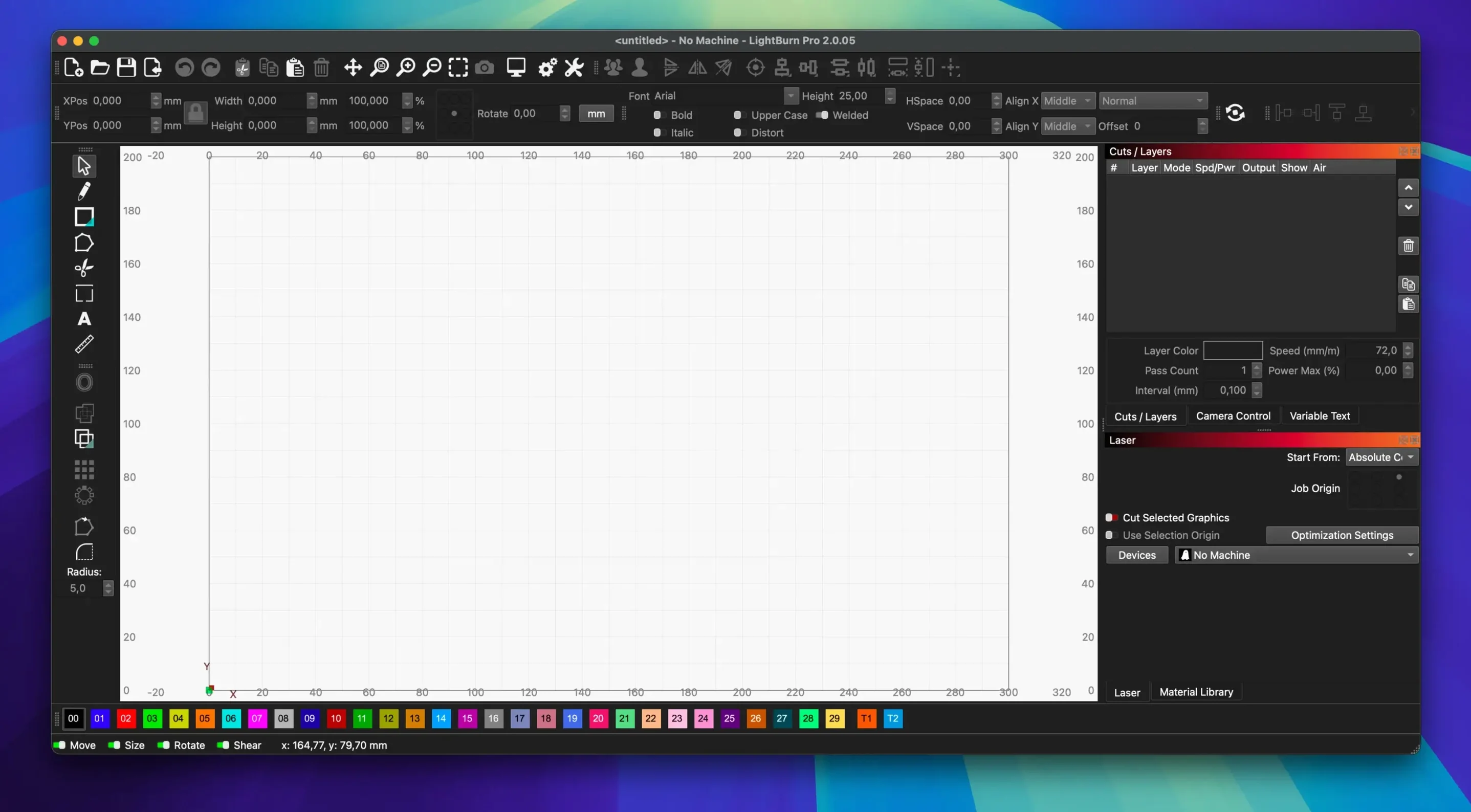
Layout and editing — a full design tool with boolean operations, offset, weld, and node editing, so you prepare artwork without leaving the app.
Laser control — direct connection to your machine; set power, speed, pass count, and cut order for every layer.
Image preparation — built-in controls for brightness, contrast, and dithering turn raster images into burn-ready layers.
Controller support — works with most GCode, DSP, and Galvo controllers out of the box, no bridging software needed.
Mac install — distributed as a standard DMG; drag to Applications and launch.
Dark Mode and a persistent Edit Nodes toolbar arrived
Version 2.0 brought a handful of changes that alter daily use. Dark Mode arrived first — less glare during long sessions, and the interface stays readable under workshop lighting. The Edit Nodes toolbar now sits permanently visible, so adjusting bezier curves or tweaking anchor points takes fewer clicks. A reworked Camera Calibration option makes aligning a camera to the laser bed quicker, with clearer visual feedback while you position the overlay.
The 2.0.05 update itself is a maintenance release. It corrects a window title bar misplacement that could occur when saved offsets were wrong, stops rotary jogging from moving in the wrong direction during CCW mode, and prevents a crash triggered by SVG files containing ungrouped DEF shapes. These are small fixes, but anyone who relies on rotary engraving or batch-imports SVG assets will notice the difference immediately.
No native ARM build — Rosetta must be installed first
Apple Silicon Macs need Rosetta. LightBurn 2.0.05 has no native ARM build yet. If you launch it on an M1 or M2 machine without Rosetta installed, nothing happens. macOS prompts you once; accept the Rosetta install, then restart the app.
DMG won’t open. A Gatekeeper warning may block the disk image on first launch. Right-click the DMG, choose Open, and confirm in the dialogue. After dragging the app to Applications, do the same for the app itself.
Laser not found. Check that no other software is holding the port — LightBurn needs exclusive access. On macOS, disconnect any other laser control utility, then reselect the port in Device Settings. If you use a USB-to-serial adapter, confirm it appears in /dev before starting LightBurn.
Rotary axis moves backward. This is the exact bug fixed in 2.0.05. If you’re on an older build, update. For CCW setups, toggling the reverse direction setting was the workaround; now the jog direction follows the configured orientation correctly.
Imported SVG crashes. Ungrouped DEF elements in an SVG could crash earlier versions. The fix in 2.0.05 handles these gracefully. If you work with SVGs from Inkscape or Illustrator, saving as a plain SVG (not Inkscape SVG) before import is still good practice — it strips unnecessary namespace declarations that can confuse any laser software.
Some users looking for a lightburn crack mac workaround can confirm whether their build includes these fixes by checking the update log. The 2.0.05 update is small but addresses real workflow interruptions, especially for those running on lightburn mac os 11 or later with rotary hardware attached.
Replaces separate design, driver, and parameter tools
Small workshop operators who run a single laser and design their own products. LightBurn replaces three or four separate tools: the vector editor, the machine driver, and the parameter spreadsheet. One app handles the design-to-burn pipeline, and the material library keeps cut settings consistent across repeat jobs.
Hobbyists moving up from web-based tools. If you have been using browser-based engraving software and want offline reliability plus finer control, LightBurn is the obvious step. The node editor and boolean tools let you create original designs rather than tracing imported clip art. And for those who previously chased a lightburn 1.7.04 crack to try the software, version 2.0.05 is a cleaner, more stable experience on current macOS releases.
Anyone with a rotary attachment. The rotary support is integrated into the layer system, not bolted on. You set the rotary parameters once per job, and the jog controls (now direction-correct in 2.0.05) let you position the workpiece precisely. Tumblers, pens, and cylindrical objects become repeatable products, not one-off experiments.
Multi-format shops. Import paths arrive as AI, SVG, DXF, or PDF; raster images come as PNG or JPG. LightBurn preserves layer structure from DXF files and editable paths from PDFs, so you do not redraw a client’s supplied artwork. For those evaluating via a lightburn download torrent, the real installer handles these format conversions smoothly so you can focus on verifying your codec setup.
On balance, the app suits anyone who wants their design tool and machine controller in the same window, running natively on a Mac, without a cloud login or a browser tab open. The 2.0.05 release tightens a few loose bolts, and the result is a practical daily driver for laser work.
What's new in LightBurn 2.0.05
- Fixed — a crash when importing SVG files with ungrouped DEF shapes.
- Fixed — window title bar placement when stored offsets were incorrect.
- Fixed — rotary jogging direction in CCW mode.
- macOS 10.13 or later
- Intel 64-bit processor
- Rosetta required on Apple Silicon Macs
- Interface language: English
Comments 0
Sign in to leave a comment.Sign inCreate an account
No comments yet. If a step is still there after you install it, say so.
More in Mac Apps
All in Mac Apps LilyView
Opens images straight from folders in a chromeless window that stays out of your way.
16 steps saved
 Little Snitch
Watches every connection and lets you decide which apps get to call home.
6 steps saved
 LaunchOS
Replaces the default app launcher with a grid you arrange on your own terms.
6 steps saved
 LanScan
Scans every active network interface and lists connected devices automatically.
16 steps saved
 Logic Pro
Puts a full studio of instruments, loops and mixing tools into one Mac app.
15 steps saved
 Loop Mash Up Pro
Triggers loops and samples alongside Logic Pro without touching the arrangement.
21 steps saved
 Updated
Loopback
Routes audio between any apps and devices on your Mac without cables.
19 steps saved
 Updated
Kontakt
Hosts sampled instruments with deep editing, a wavetable engine, and direct MIDI manipulation tools.