Portraiture is a skin-retouching plugin for Photoshop and Lightroom Classic that replaces tedious pixel-by-pixel work with an automated, mask-based workflow.
Set the smoothing range
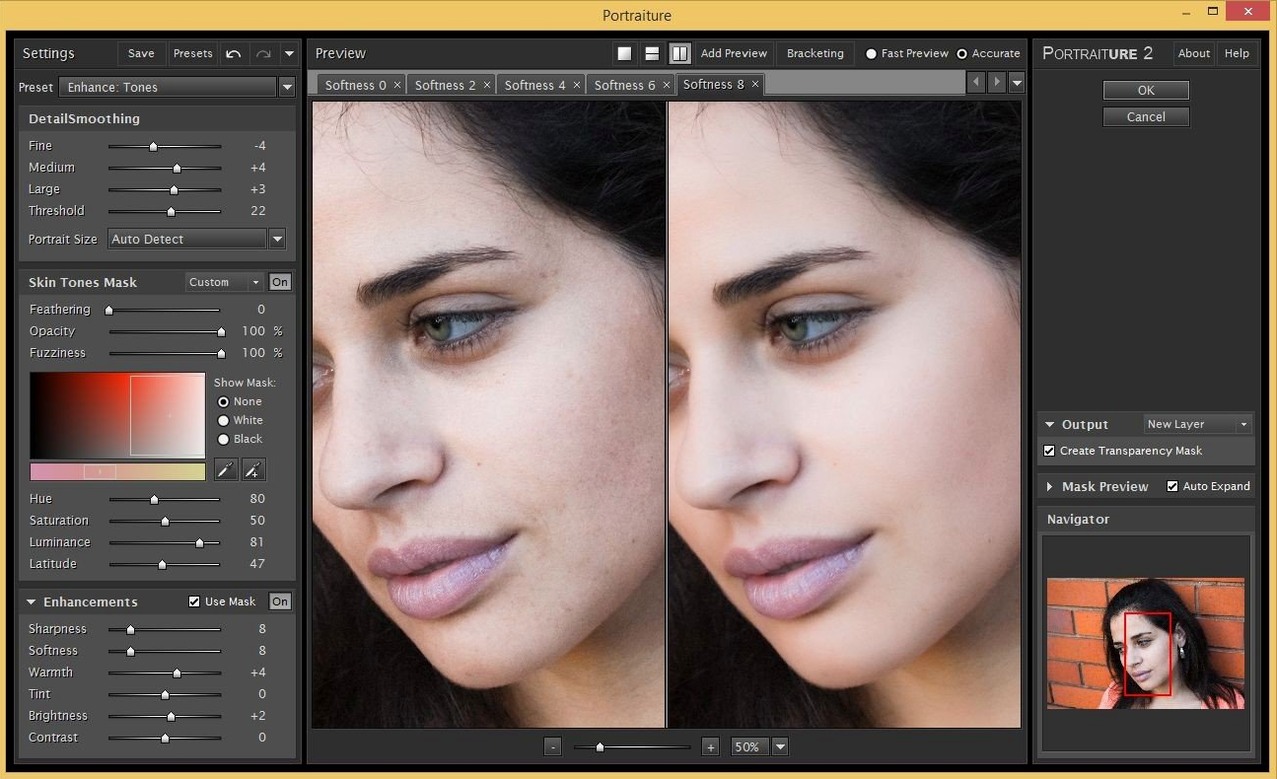
The Detail controls let you dial in which skin texture gets smoothed. Fine, Medium, and Large sliders target different feature sizes so pores soften while lashes stay sharp.
Tune the skin mask
A dedicated Skin Mask panel isolates tones automatically. Adjust Hue, Saturation, and Luminance ranges to include or exclude areas without painting a single mask stroke.
Reveal the skin only
The output defaults to skin-only masking. Toggle the overlay view to check exactly where the effect lands, then refine with the Opacity slider for a natural finish.
Switch to 100% preview zoom before you mask anything
Portraiture ships with sensible defaults, but three adjustments deliver noticeably better results the moment you set them.
Switch the preview zoom to 100% immediately. The default fit-to-screen view hides texture detail that matters for skin work. A 100% view shows exactly what the smoothing engine sees — and what it might smear. Check eyes, hair edges, and shirt collars at full resolution before trusting the mask.
Set the output to Current Layer plus a mask. The plugin can output a flattened result straight onto your layer. Choose Current Layer & Mask instead. You gain a non-destructive mask you can paint into later for areas Portraiture missed or over-softened. This one setting saves rework on every image.
Lower the default Opacity to 70–80%. The full-strength effect reads as plastic on most skin types. Dial it back, then nudge upward only if the subject needs it. Combine with a soft-light blend mode on the result layer, and you get glow without the wax.
Also worth doing early: save a preset for each lighting condition you shoot in regularly. Studio strobes, window light, and golden-hour backlight each need slightly different skin-mask ranges. Build them once and apply them in two clicks.
Native Apple Silicon support means no Rosetta slowdown
Does Portraiture run on Apple Silicon Macs? Yes. The plugin is a universal binary, so it runs natively on both Apple Silicon and Intel processors under macOS 13 and later. No Rosetta translation overhead.
Can I use it outside Photoshop? The Mac build supports Photoshop, Lightroom Classic, and Affinity Photo. Each host needs its own installer — Imagenomic distributes separate downloads for the Photoshop and Lightroom Classic builds. Affinity users load the Photoshop plugin version through Affinity's Photoshop plugin support.
Will it slow down my batch workflow? Portraiture adds processing time per image, but it replaces far slower manual retouching. On a modern Mac, a 24-megapixel portrait processes in a few seconds. Batch users typically build an action that calls a saved preset, then run it across a folder while they make coffee.
Does it work on group shots? It can, but the mask attends to every face in the frame. The smoothing is global — you cannot assign different settings to different people in one pass. For uneven group lighting, run separate passes on masked duplicates of the layer.
Is there a free version floating around? Searches like imagenomic portraiture for mac free and portraiture mac crack turn up regularly. The cracked copies tagged imagenomic portraiture 3 crack for mac or imagenomic portraiture 3 crack mac are older builds that lack the current AI engine, so check compatibility with your macOS version before installing. Plugin stability matters when you are sixty layers deep in a retouch session.
How Portraiture compares with similar Mac plugins
Portraiture versus Retouch4me Skin. Retouch4me works as a standalone application and a plugin. It relies entirely on neural-network processing with zero user-adjustable parameters — it makes decisions for you. Portraiture gives you sliders and a mask editor, so you can steer the result. Retouch4me sometimes produces cleaner edges around hair, but Portraiture leaves you with a mask layer you can refine, which matters when the AI guesses wrong.
Portraiture versus ON1 Portrait AI. ON1 bundles face-aware masking, eye whitening, and teeth brightening into one panel. It tries to do a full headshot cleanup in a single step. Portraiture focuses on skin texture alone and gives finer control over what counts as skin. Photographers who already handle eyes and teeth in Photoshop often prefer Portraiture's narrower scope — it does one job and stays out of the way for the rest.
Portraiture versus the built-in Photoshop tools. Frequency separation and the Camera Raw texture slider can both smooth skin without a plugin. They cost nothing extra and give direct control. What they lack is Portraiture's automated skin-tone masking. Manual frequency separation still demands brushwork on every image. Portraiture removes that step for high-volume portrait sessions. The plugin earns its place when the volume of images makes manual masking unreasonable.
Batch-retouch fifty headshots with one lighting preset
High-volume portrait photographers. If you deliver fifty or more headshots per session, Portraiture pays for itself quickly. Build a preset per lighting setup, assign an action to it, and run batches while you edit the hero shots manually. The time saved is measurable in hours per job.
Wedding and event editors. Wedding galleries mix candid skin tones across dozens of lighting conditions. Portraiture's mask panel handles warm reception light and cool outdoor shade without repainting masks. The non-destructive output layer lets you tweak individual images after the batch pass, keeping the couple's skin consistent across the album.
Retouchers who already own a Wacom. If you are comfortable painting layer masks by hand, Portraiture becomes a first-pass engine rather than a final step. Let it build the mask and smooth the skin, then paint the mask back in over eyes, jewellery, and shirt collars. The plugin handles the drudgery; you handle the judgement calls.
Affinity Photo users on Mac. Affinity's own retouching tools are capable but manual. Portraiture works as a portraiture plugin for photoshop mac and loads into Affinity's plugin layer, bringing automated skin masking to a host that lacks a native equivalent. It fills a gap for photographers who left Adobe but still need fast portrait cleanup.
Users who retouch fewer than ten portraits a month may find the plugin overbuilt for their needs. Photoshop's native tools handle occasional portraits without extra software. Portraiture justifies itself when the portrait count climbs and consistency across images matters more than per-pixel control on a single frame.
- New — Next-generation AI smoothing engine in Build 4501.
- macOS 13 or later
- Intel and Apple Silicon
- Photoshop or Lightroom Classic
Questions I get before install
Does Portraiture work with Lightroom Classic?
Yes. Imagenomic provides separate plugin builds for Photoshop and Lightroom Classic on macOS 13 and later.
Comments 0
Sign in to leave a comment.Sign inCreate an account
No comments yet. If a step is still there after you install it, say so.
More in Mac Apps
All in Mac Apps Imagenomic Plugin Suite
Consolidates skin retouching, noise reduction, and resizing under one installer.
4 steps saved
 iMazing
Backs up, browses and moves iPhone and iPad data without iTunes.
17 steps saved
 Infuse Pro
Plays nearly any video format natively across Mac, iPhone, iPad, and Apple TV.
9 steps saved
 iExplorer
Mounts an iPhone or iPad on your Mac for direct file browsing without a jailbreak.
15 steps saved
 IDA Pro
Picks apart executables with a guided disassembler, decompiler, and debugger.
16 steps saved
 iReal Pro
Generates a backing band from chord charts so you can rehearse like a full ensemble.
6 steps saved
 iStat Menus
Puts CPU, memory, and network graphs in your menu bar to catch issues early.
17 steps saved
 Updated
Hopper Disassembler
Disassembles and decompiles binaries so you can trace logic or audit code.