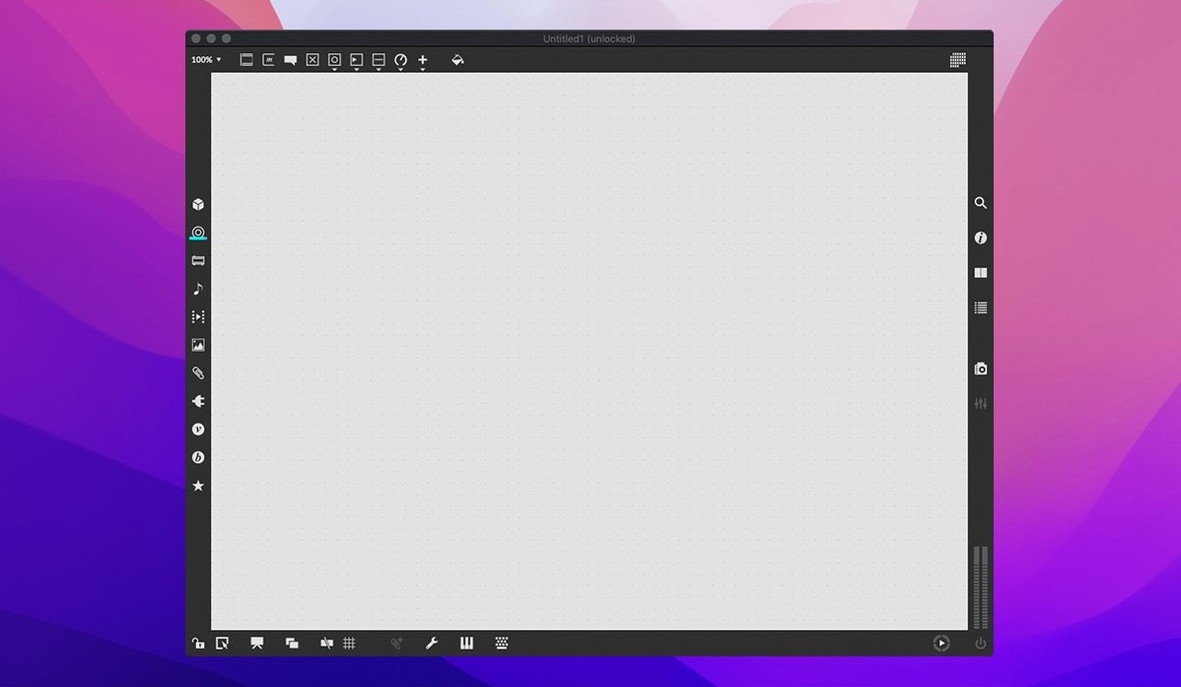
Version 9.0.9 ships with RNBO v1.3.5 and patches a crash in the Inspector that could trigger while editing a text field. For anyone building custom audio tools, the Inspector is a workspace you live in, so that fix matters.
| Detail | Note |
|---|---|
| macOS | 11 or later |
| Architecture | Apple Silicon & Intel 64-bit |
| Language | English |
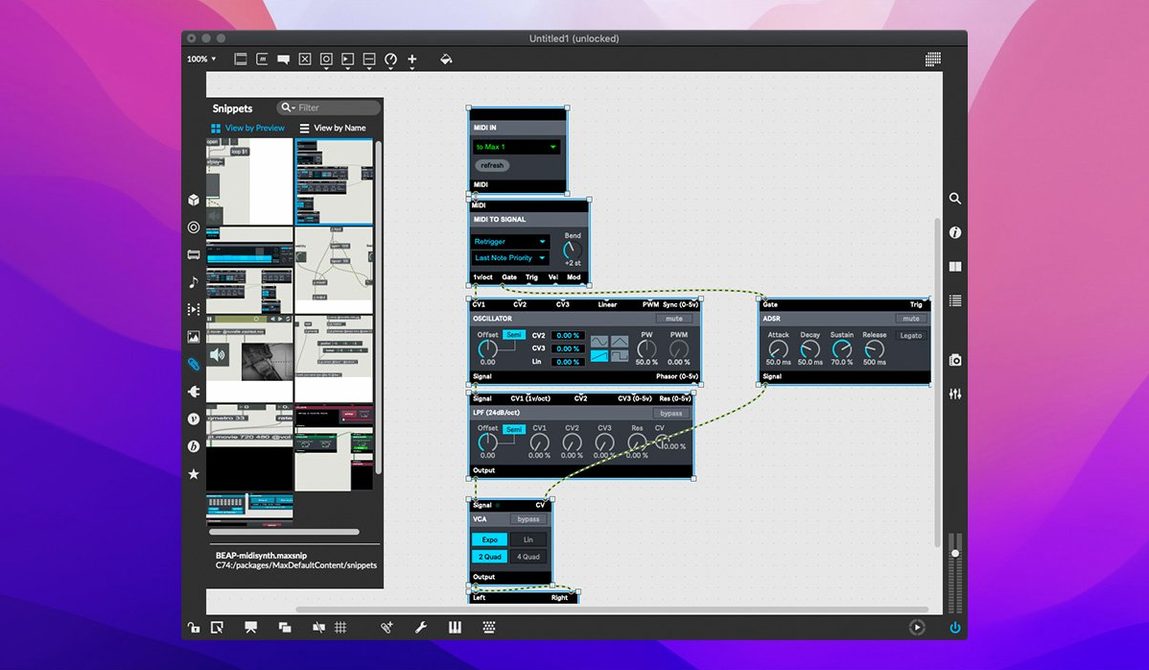
Max is a visual programming language where you patch together hundreds of modular objects to generate sound, process video, or build interactive interfaces. A composer might chain oscillators and filters into a live performance rig. A researcher could route sensor data through a signal-analysis graph. An installation artist may map a dozen UI widgets to lighting cues. The patcher window is the core workspace—drag an object, connect a cord, and tweak the behaviour in the integrated Inspector. When logic gets tangled, the program steps in with message tracing, breakpoints, and a function editor that lets you draw and debug modulation curves directly. More than forty interactive tutorials ship with the download, walking you through everything from basic arithmetic objects to Jitter matrix processing. The cross-platform patch format means a project built on a Mac opens on Windows without translation headaches.
Max as a Construction Yard, Not a Tape Machine
Does Max replace a DAW, or sit alongside one? Max is not a linear recorder. It complements a DAW—think of it as a construction yard where you build the instruments, effects, and sequencers your DAW loads. Many users run Max as a ReWire or routing target, or export patches as VST/AU plug-ins via RNBO. If you already work in Logic or Ableton Live, Max extends what you can make those environments do.
How steep is the learning curve if I have never patched before? The first afternoon feels unfamiliar; the visual grammar of objects, inlets, and patch cords is its own language. The bundled tutorials—over forty of them—are genuinely useful. Start with "Hello" and follow the numbered sequence. Within a week of daily sessions, you will be assembling MIDI processors and basic synths without consulting the documentation at every step. The object-level help system is a right-click away on any box you drop into a patcher, and it loads working demonstrations you can copy from.
Will my older Max 8 patches open in Max 9? The format is designed to be forward-compatible, and Cycling '74 tests against a regression suite that covers many years of objects. A patch built in Max 8 should open without intervention. That said, if you rely on third-party externals, check that the developer has compiled them for Apple Silicon and the current SDK.
Building a Random Melody Generator: A Workflow
Imagine you need a patch that creates unpredictable eight-note patterns and sends them to a software synth. Here is one route through the patcher window.
- Create a new patcher and add a
metroobject set to 500 milliseconds. This will be the clock. - Connect the metro to a
random 12object. Every beat, random outputs a value between zero and eleven. - Pipe that integer into a
+ 48object to shift the range into the lower MIDI octaves. - Feed the sum into a
makenote 80 200object. This wraps each number in a note-on and note-off pair with a velocity of 80 and a duration of 200 milliseconds. - Route the makenote output to a
noteoutobject. Open the MIDI Setup dialog to pick a destination port. - Add a
toggleconnected to the metro inlet, plus a fewlive.textwidgets to display the current pitch and note count. - Save the patch. Toggle on. Adjust the metro interval and random range while it runs.
From blank canvas to a patch that improvises melodies, the whole build takes under ten minutes once you know the object set. The Inspector stays open throughout to rename objects and colour-code sections so the layout remains readable when you return to it weeks later.
Picking Up Yesterday’s Half-Finished Granular Scrubber
You open Max in the morning and the patcher window from yesterday’s session loads automatically—a half-finished granular scrubber you are building for a sound design commission. The audio engine starts; a quick test signal confirms the buffer is still reading the sample you loaded last time. Something crackles in the right channel, so you open the signal path in the debugger and drop a breakpoint on the groove~ object. Message tracing reveals a rogue amplitude spike from an envelope module upstream.
You open the function editor, smooth the curve by dragging three breakpoints, and restart the transport. The crackle is gone. Satisfied, you turn to the UI—a handful of live.slider and live.dial objects that need parameter-bank assignments so the performer can recall presets mid-set. The live.banks object in version 9.0.9 now supports button assignments, so you map four recall slots to a grid and wire the output to the grain-density controls. A quick test with a MIDI controller confirms the mapping holds.
Before lunch, you duplicate the main patcher into a subpatch, tidy the cord routing with the align-distribute tools, and save a snapshot. The session produced no finished piece, but the tool is now stable, controllable, and ready for the studio session next Tuesday.
- New — Button assignments for parameter banks in live.banks. RNBO v1.3.5 is now bundled.
- Fixed — Inspector no longer crashes when editing or closing a text field.
- macOS 11 or later
- Apple Silicon or 64-bit Intel processor
Questions I get before install
Who uses Max?
Composers, performers, software developers, researchers, and artists use Max to build custom interactive music and multimedia systems.
Comments 0
Sign in to leave a comment.Sign inCreate an account
No comments yet. If a step is still there after you install it, say so.
More in Mac Apps
All in Mac Apps Cursor Pro
Magnifies the pointer so a room follows your walkthrough without squinting.
17 steps saved
 DaisyDisk
Maps disk usage as an interactive sunburst chart so you spot what is eating space in seconds.
21 steps saved
 Updated
Cubase
Records, arranges and mixes music with deep MIDI editing and scoring tools.
17 steps saved
 Updated
Dash
Gives developers instant offline access to API docs and code snippet libraries.
22 steps saved
 Updated
DataGrip
Reads your database schema and catches query mistakes before you run them.
4 steps saved
 Updated
CrossOver
Translates Windows commands so a game or launcher runs on your Mac.
11 steps saved
 DataSpell
Combines notebooks, datasets, and a Python console for focused data exploration.
9 steps saved
 DaVinci Resolve Studio
Covers editing, colour, effects, and audio post-production inside a single application.