
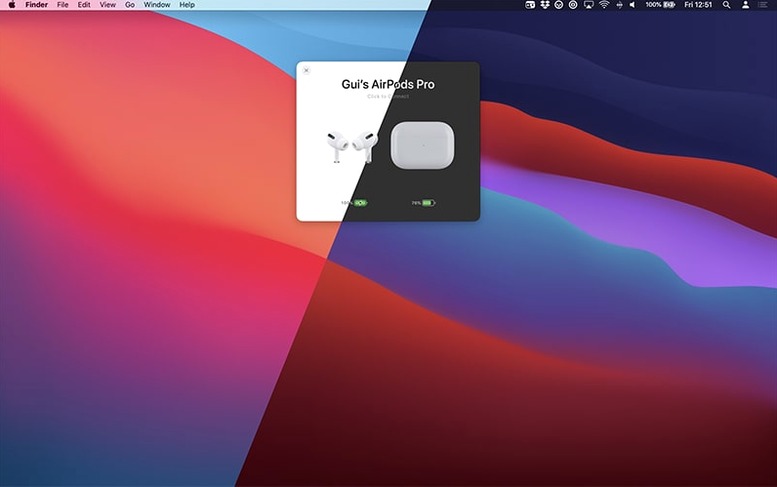
Proximity triggers the status panel automatically as you flip open an AirPods case.
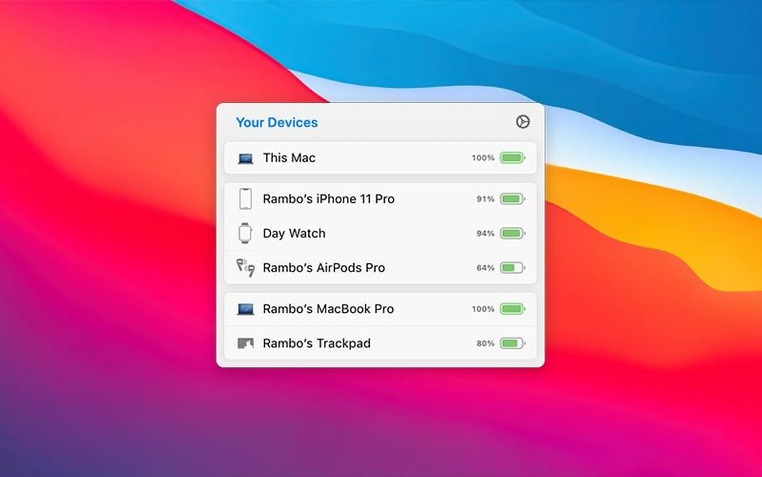
Device Status — a live dashboard of every nearby Apple peripheral and its charge level, grouped by relationship to your Mac.
Connection Modes — preset behaviours that set listening mode, volume, and microphone state the moment you connect.
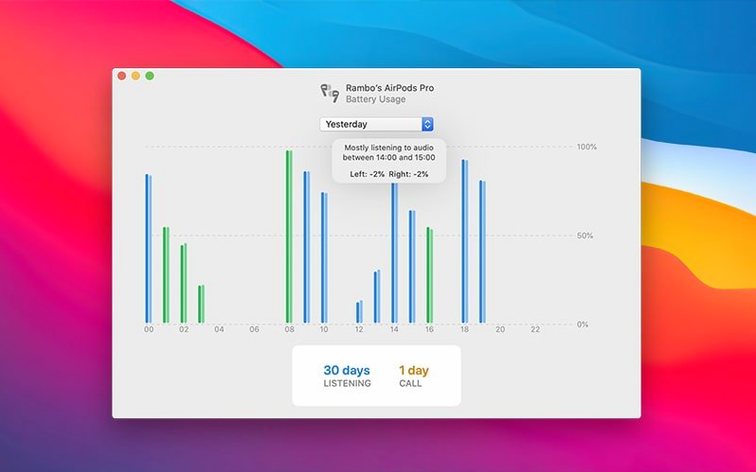
Usage History — total listening and talk time charted across the previous 12 hours, 24 hours, or the full previous day, colour-coded by headset.
Peripheral Handoff — move AirPods or Beats between your Mac, iPhone, and iPad without digging through Bluetooth menus.
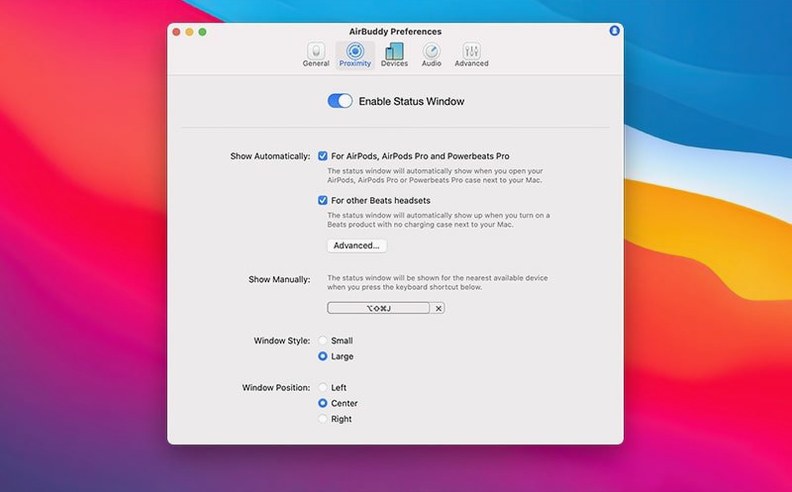
A trackpad gesture switches listening mode on AirPods Pro directly from the Mac. The menu bar icon adapts to show the app icon, a compact battery indicator, or nothing at all.
First Days with AirBuddy
Set up one Connection Mode per context and let it run. A morning mode that sets volume to 40% and enables Transparency, a focus mode with Noise Cancellation and the mic muted — the app matches the setting to the device pair automatically, so you stop adjusting sliders.
Check the Usage History panel on day two. The left/right drain balance tells you whether one earbud consistently drops faster. A persistent gap often points to microphone preference, not a dying cell. Switch mic assignment in macOS Sound settings and watch the chart flatten.
Place the status window where it won't compete with notifications. The large variant works well pinned to the lower-right corner; the compact one tucks neatly beside the menu bar clock. Drag it once and AirBuddy remembers the position across restarts.
If you run an airbuddy beta alongside the stable release, isolate them on separate macOS user accounts. The daemon that talks to Bluetooth won't distinguish between two instances, and device discovery turns unreliable when both compete for the same radio.
Sees Nearby Devices the Bluetooth Menu Ignores
Does it duplicate what macOS already shows? Only partially. The Bluetooth menu lists battery percentages for connected devices. AirBuddy adds proximity awareness, groups your phone beside your earbuds, and surfaces devices that aren't currently connected but are nearby. The difference is speed: one glance versus three clicks.
Will it conflict with other Bluetooth utilities? It plays nicely with most, but avoid running another app that also polls battery data every few seconds. Two aggressive pollers create the same radio noise that affinity beta testers sometimes report when Bluetooth input devices and Wi‑Fi saturate the same band. If you use a hardware Bluetooth scanner for design work, schedule its active hours to not overlap.
What about Handoff and Continuity? AirBuddy supplements, doesn't replace, the built‑in handoff chain. Your Mac still takes calls and switches audio routes per Apple's rules. AirBuddy just adds a visible switch for edge cases — moving headphones to an iPad while the Mac stays on, or grabbing a Magic Trackpad without walking to the other desk.
Does it need background permissions? Yes: Bluetooth, notifications, and accessibility access for the peripheral handoff feature. Grant them during setup and the app stays quiet until a device appears nearby.
How It Fits the Wider Workflow
AirBuddy sits between hardware and the apps you already use. It does not play audio, route calls, or replace the Sound menu. Think of it as a status layer that feeds device awareness into the rest of the system.
For airbuddy mac setups that involve multiple Macs, pair it with a keyboard‑switching utility. Magic Handoff moves the peripheral; the companion utility shifts the display source. Together they collapse a six‑step desk swap into two actions.
Users who run creative tools — the sort who also keep an adobe beta generative fill workflow open — benefit from AirBuddy's connection modes most when switching between a quiet rendering session and a collaboration call. Assign one mode that kills the mic and maxes noise cancellation for deep work, another that opens transparency and sets volume to conversation level. Trigger either from a keyboard shortcut without leaving the canvas.
The usage history logs complement macOS Screen Time. Where Screen Time tracks application hours, AirBuddy tracks ear hours. Cross‑reference the two datasets at the end of a long week to spot mismatches: hours of screen activity with zero headphone use might mean you forgot to put them on, or they never connected. Either way, it's a signal worth catching.
- New — Menu bar icon choice: app icon, battery indicator, or no icon.
- New — Peripheral handoff between Macs, iPhone, and iPad.
- Improved — Device status view groups peripherals by relationship.
- Improved — Connection modes now manage listening mode, volume, and microphone state.
- macOS 14 or later
- Apple Silicon or Intel Mac
Questions I get before install
What devices appear in AirBuddy's status view?
It shows AirPods, Beats, and nearby iPhone, iPad, and other Mac devices, grouped by their relationship to each other.
What does the usage history track?
It tracks total listening time and total talk time for your headsets, viewable across the previous 12 hours, 24 hours, or the full previous day.
Which version of macOS does the AirBuddy 3 beta require?
The current beta requires macOS 14, and the release notes indicate the final release will require macOS 13 or later.
Comments 0
Sign in to leave a comment.Sign inCreate an account
No comments yet. If a step is still there after you install it, say so.
More in Mac Apps
All in Mac Apps AIMP
Plays and organizes a local music collection without streaming dependencies.
6 steps saved
 Airflow
Casts video files from a Mac to a Chromecast without converting formats.
13 steps saved
 Airfoil
Sends audio from any single Mac app to speakers around the house.
11 steps saved
 Aiarty Video Enhancer
Upscales, deblurs, and cleans up video clips and their audio in one pass.
11 steps saved
 Alcove
Collects media controls and live notifications into one Dynamic Island-style overlay.
15 steps saved
 Aiarty Image Enhancer
Rebuilds lost facial detail and fabric texture in compressed photos.
9 steps saved
 AlDente
Keeps a MacBook battery at a chosen charge limit to slow chemical aging.
17 steps saved
 Alfred 5 Powerpack
Chains file actions, searches, and scripts into automated sequences from the keyboard.