
Budgets, forecasts and audit workbooks need one shared file, not a chain of email attachments. That is the job Excel does.
What does Excel do on a Mac?
It creates, views, edits, and shares spreadsheet files. It sits in the Office for Mac suite next to Word, PowerPoint, Outlook and OneNote.
Who is it for?
Accounting, audit, and finance teams that need collaboration in familiar workbook formats. It also suits anyone managing budgets, lists, or light data analysis on macOS.
What’s the architecture support?
First days after installing
Start with one workbook, not ten. Open a file you already trust and check how the formulas, pivot tables and named ranges look. Excel for Mac handles the same file formats as the Windows build, so most workbooks open without conversion.
Three habits save time early:
- Set the default file location. Point Excel to the folder where your team keeps shared workbooks, so every Save As starts in the right place.
- Pin frequent files. The recent list is useful, but pinned workbooks stay visible when the list rotates.
- Turn on AutoSave only for cloud files. Local files follow the classic save model, which matters for audit trails.
Check the calculation settings too. Large workbooks with thousands of volatile formulas feel slower if Excel recalculates on every keystroke. Manual calculation mode keeps editing responsive; switch to automatic when the numbers need a full refresh.
Compared with similar Mac apps
Excel vs. Apple Numbers
Numbers is lighter and easier for a one-page budget or a quick chart. Excel is the tool when a workbook grows to multiple sheets, cross-sheet references, data validation rules and pivot tables. Teams exchanging files with auditors or clients almost always standardise on Excel because formatting and formulas travel without surprises.
Excel vs. LibreOffice Calc
Calc opens and edits Excel files without a Microsoft account, which makes it a common fallback. The trade-off is fidelity: complex conditional formatting, Power Query connections and some chart types do not survive a round trip unchanged. Excel for Mac keeps those features intact for teams already inside the Office ecosystem.
Excel vs. Google Sheets (in a browser)
Sheets wins on simultaneous editing and zero-install access. Excel wins when the workbook contains macros, advanced charts, external data connections or large data sets that make a browser tab choke. Many finance teams keep both: Sheets for quick collaborative lists, Excel for the models that matter.
A working session, step by step
A controller opens a monthly close workbook at nine in the morning. The file has twelve sheets: one per cost centre, plus a summary tab with formulas pulling figures from each. She updates the first cost centre, types the new accrual, and the summary recalculates.
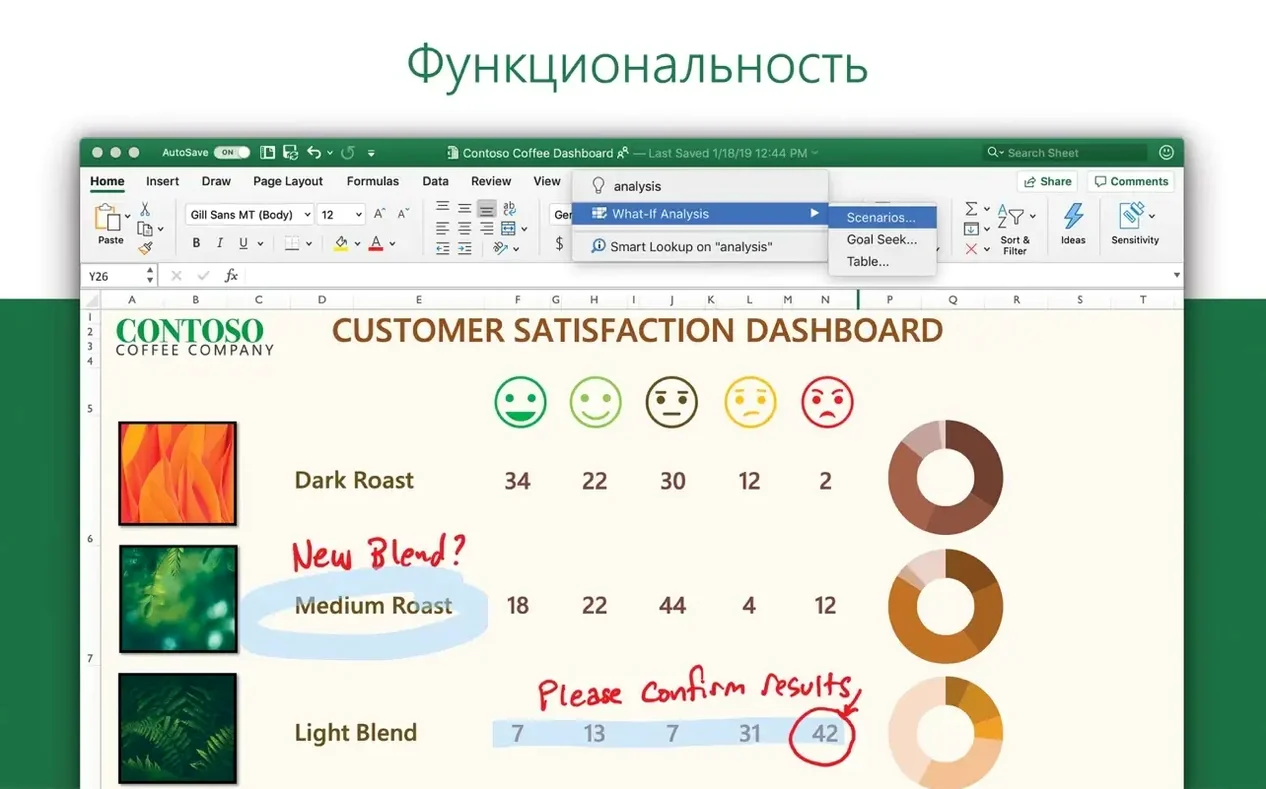
Next she adds a chart to show travel spend against budget. She selects the two columns, picks a clustered column chart, and drags it next to the summary table. Then she opens the Ideas pane to see whether any trend jumps out — a spike in software subscriptions, visible at a glance.
Before lunch, she shares the workbook with the audit team. Comments are added to three cells where estimates replaced actuals. The auditors open the file on their own Macs, reply to the comments, and save a version for the working papers folder. No email attachment changes hands.
The session closes with a data refresh. The controller updates the exchange rate table, confirms the figures flow through to the summary, and pins the workbook for tomorrow.
Questions people ask before installing
Does it feel like Excel for Windows?
Close, but not identical. Ribbon layout, formula syntax and file formats match what Windows users expect. Keyboard shortcuts differ where the Mac platform uses Command instead of Control. A finance user switching from Windows needs a day to adjust, not a week.
Will my macros work?
Most simple VBA macros run without changes. Macros that call Windows-specific libraries, ActiveX controls or certain COM objects do not. Teams should test the workbook they rely on before rolling Excel out to everyone.
Can I open files from older Office versions?
Yes. The app reads and writes the standard .xlsx, .xlsm and .xls formats. Workbooks created years ago open normally, though very old .xls files may prompt a compatibility check.
Does it work without an internet connection?
Yes. Local workbooks, formulas, charts and analysis tools work offline. Collaboration features and cloud file access need a connection.
What about sharing files with people who don’t use Excel?
Export to PDF keeps reports readable. For live collaboration, the workbook can be saved to a shared location and opened by anyone with a compatible spreadsheet app — though features like threaded comments and Ideas stay within Excel itself. Some teams searching for torrent excel mac or excel for mac torrent want the desktop app without a browser; the installed build handles that directly.
Is installation complicated?
No. The standard Office installation procedure covers Excel, Word, PowerPoint, Outlook and OneNote. After install, Microsoft AutoUpdate keeps the apps current. Activation through the volume license serializer is a one-time step for managed deployments.
Excel runs natively on both ARM (Apple Silicon) and 64-bit x86 hardware. No emulation layer is required.
- New — New charts for visualizing data.
- New — Ideas pane for spotting trends and patterns in selected data.
- macOS 13 or later
- Apple Silicon or 64-bit Intel processor
Questions I get before install
Which apps come alongside Excel?
The Office suite for Mac also includes Word, PowerPoint, Outlook, and OneNote.
What languages does Excel for Mac support?
The interface comes in over twenty languages including English, French, German, Japanese, Russian, and Spanish.
What’s the minimum macOS version for the current release?
Version 16.93 requires macOS 13 or later.
Comments 0
Sign in to leave a comment.Sign inCreate an account
No comments yet. If a step is still there after you install it, say so.
More in Office
All in Office Microsoft Office
Gives a team six tools for documents, spreadsheets, and presentations.
13 steps saved
 Microsoft Outlook
Puts mail and calendar in one window so you stop switching apps.
11 steps saved
 Microsoft PowerPoint
Builds presentation decks that move past static bullet points.
8 steps saved
 Microsoft Word
Writes and reviews documents with tracked changes that open the same anywhere.
7 steps saved
 OmniFocus Pro
Flattens vague plans into tagged, location-aware actions you can actually complete.
13 steps saved
 OmniPlan Pro
Breaks a complex initiative into trackable tasks linked by dependencies and resources.
9 steps saved
 OmniReader Pro
Opens PDFs, ebooks and documents in one reader with notes and reading modes.
22 steps saved
 Updated
iA Writer
Strips away formatting so you focus on structure and phrasing, then export to any format.