



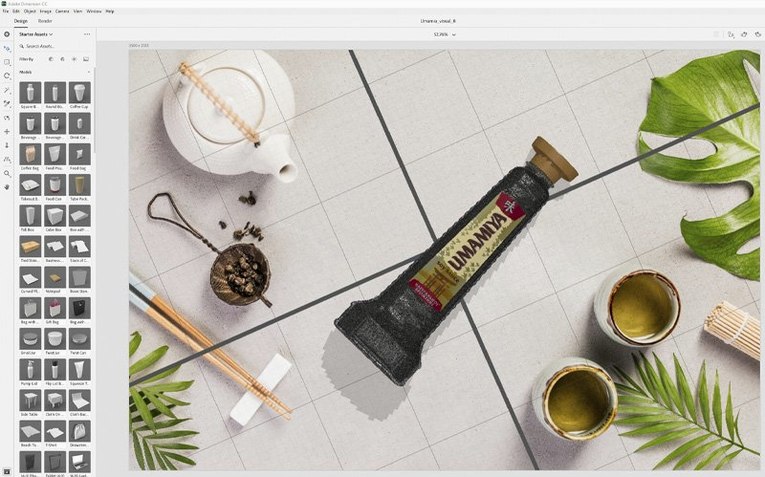
Intel build runs through Rosetta 2 on M‑series
Dimension 4.1.7 runs on Intel-based Macs with macOS 11 or later. It is an Intel build, so M-series Macs run it through Rosetta 2; the 4.1.7 release is a security update.
Workflow for Experienced Users
- Source optimized models. Search Adobe Stock directly from the app for 3D models tuned for Dimension. Skip the cleanup and get straight to layout.
- Build your scene. Place, rotate, and scale objects in a live render preview. The controls are built for people without a 3D background.
- Apply materials and graphics. Drag brand assets, colours, and textures onto any surface. The scene updates as you go.
- Render locally. Produce a photorealistic image from a single frame. Use this for packaging designs, brand visualizations, and quick client approvals.
- Export layered files. Send the finished render to Photoshop CC with objects on separate layers. Retouch, adjust depth of field, or add 2D elements with full control.
Dimension replaces the need to jump between a modelling tool and a renderer for product shots. It handles the heavy lifting of scene creation so you can focus on iterating the visual.
Integration with the Adobe Ecosystem
Dimension reads PSD files directly. Place a layered Photoshop comp onto a 3D surface, or pull in Illustrator vectors as decals. Edits update non-destructively when the source file changes.
Export to Photoshop CC preserves camera angles, object masks, and material IDs as separate layers. That layer stack makes post-production predictable: adjust reflections on one layer, colour-grade the background on another, sharpen the product silhouette on a third. No re-rendering required.
Adobe Stock models appear inside the starter assets panel. Drag a pre-lit bottle, box, or device into the viewport and start applying graphics immediately. The stock integration cuts out the geometry hunt that usually stalls early layout work.
Performance and Everyday Use
On Intel Macs, scene navigation stays fluid with moderate polygon counts—six to twelve product models plus a background plate rarely stutter during camera moves. The render engine leans on the CPU, so expect a quiet machine and a warm chassis during final output. Memory pressure climbs with 4K exports; 16 GB RAM handles most single-frame renders without swapping.
Stability is what you would expect from a mature Creative Cloud app. The 4.1.7 security patch did not introduce regressions in material previews or layer naming. Scenes that loaded in 4.1.6 open identically. The app rarely beachballs outside of a render-in-progress, and autosave snapshots are frequent enough that a crash rarely costs more than the last material tweak.
For teams already inside the Adobe stack, Dimension removes the round-trip to a dedicated 3D package. A designer can rough out a packaging concept, place it on a photographed desk background, match the horizon line with the automatic perspective tool, and hand a layered PSD to a retoucher—all without leaving the Creative Cloud suite.
- Fixed: Resolved security vulnerabilities.
- macOS 11 or later
- Intel processor
Comments 0
Sign in to leave a comment.Sign inCreate an account
No comments yet. If a step is still there after you install it, say so.
More in CAD & 3D
All in CAD & 3D Adobe Substance 3D Painter
Applies textures to 3D models with editable layers and Smart Materials.
18 steps saved
 ArchiCAD
Shares BIM objects across a studio without leaving the modelling tool.
11 steps saved
 Artlantis
Converts raw 3D models into presentation-ready stills with natural light.
21 steps saved
 AutoCAD
Scans a drawing and converts repeated geometry into reusable blocks.
17 steps saved
 BricsCAD
Handles 2D drafting and 3D modelling while working directly with .dwg files.
4 steps saved
 CorelCAD
Drafts 2D plans and 3D parts in a DWG-native CAD workspace.
9 steps saved
 Garden Planner
Drags plants and surfaces onto a canvas to arrange outdoor spaces.
17 steps saved
 KeyShot
Renders physically accurate product visuals from CAD data with real-time global illumination.