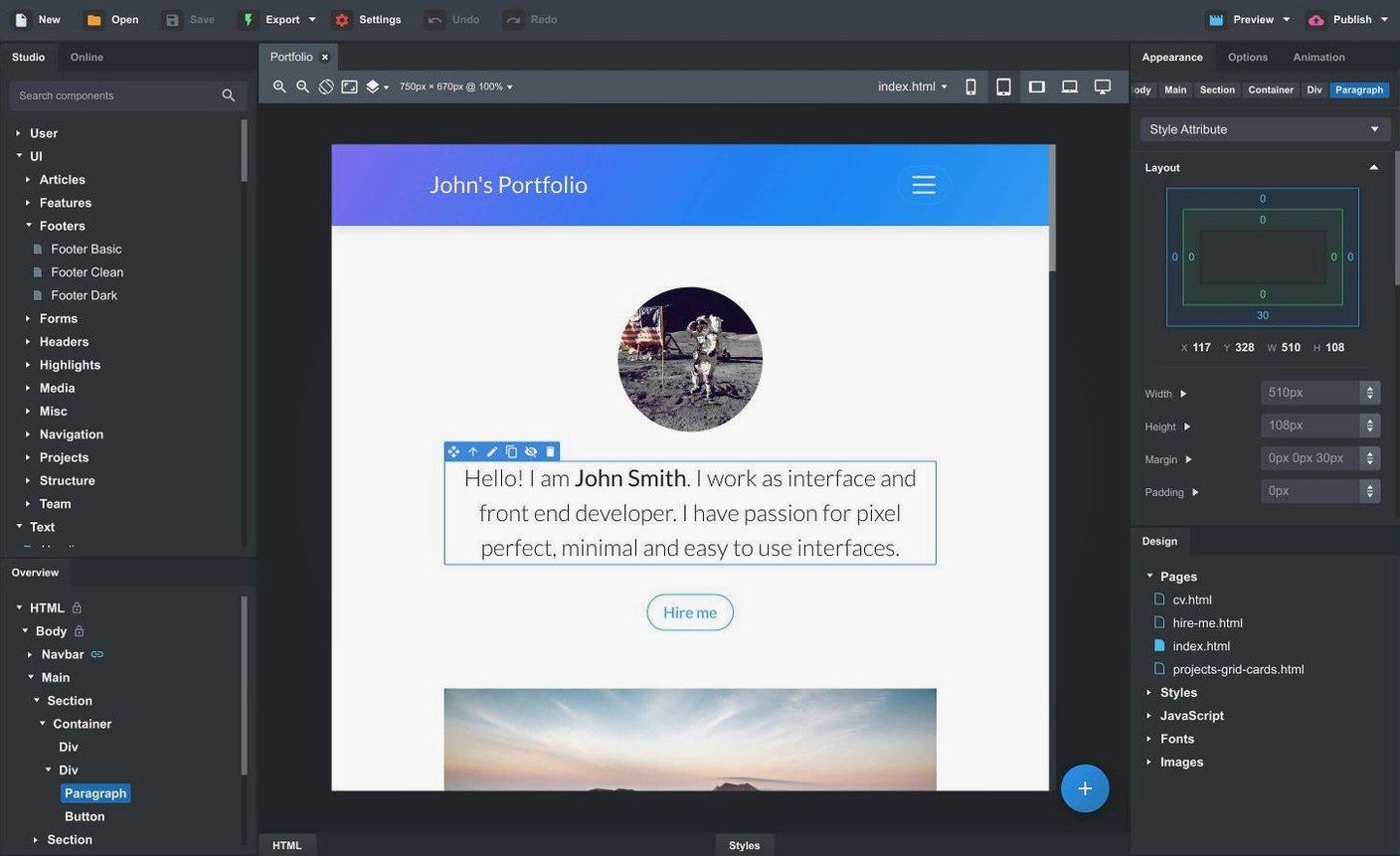
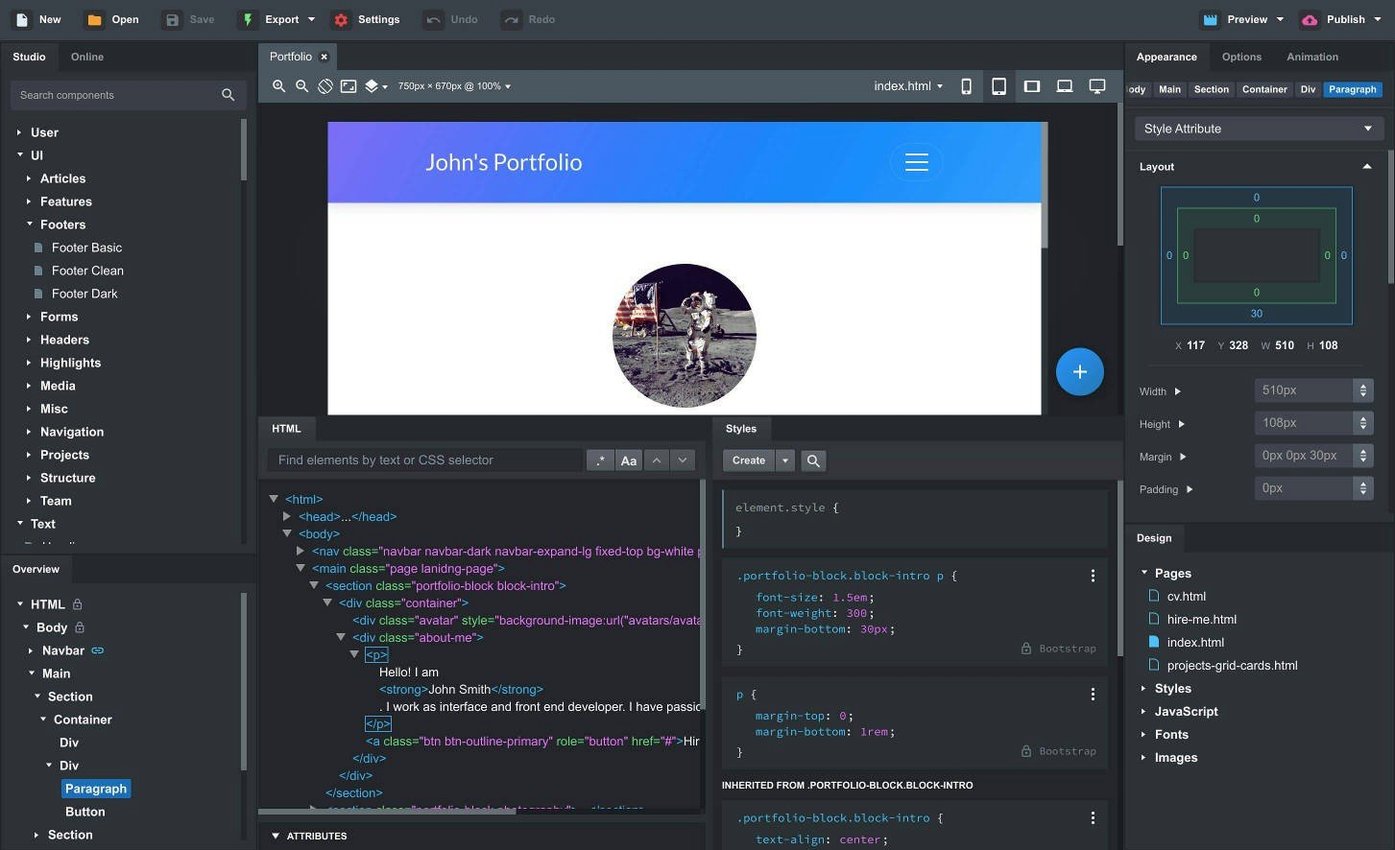
Front-end developers and designers who spend their day in a code editor but want a faster way to build responsive layouts. Bootstrap Studio sits on your Mac desktop, not in a browser tab, so it feels like a native part of your toolkit alongside Sketch, VS Code, or Transmit.
It handles the repetitive parts of Bootstrap development. Drag components onto a canvas, edit text directly, and watch the live preview update across multiple browsers and device sizes. When you need to bring in existing work, drop in HTML, CSS, JS, and image files. The app parses them into an editable project without mangling your markup.
What sets it apart from generic builders is the SCSS editor and linked components. Edit a linked component once and it synchronizes across every page that uses it. Create custom components from parts of your own design and reuse them project-wide. The online library of community-built components gives you a starting point without locking you into proprietary formats.
Export is clean, semantic HTML. No inline styles sprayed everywhere, no framework lock-in. You get standard Bootstrap 5.3, 4.6, or 3.4 markup you can hand off to another developer or drop straight into a static site pipeline. The AI Assistant, now supporting gpt-4o and gpt-4o-mini, can generate or refine markup inside the app, saving you the context-switch to a separate chat window.
A freelance designer's afternoon
A brand designer lands a rush job: a five-page responsive site for a coffee roaster. She isn't a full-time developer, but she knows Bootstrap well enough to build what she sketches. With Bootstrap Studio she drags a navbar onto the canvas, swaps the brand typeface through the CSS editor, and pastes the roaster's colour palette into the SCSS variables. Within an hour she has a working prototype to show the client over Zoom. The client asks for a sticky announcement bar. She checks the new Sticky On option, picks md, and pushes the live preview to her phone. Done.
Later the roaster sends over their actual product photography. She drags the folder straight into the Design panel — the app re-links the images across all pages without her touching a single
Importing designs from Sketch or Figma to rebuild with real components
Bootstrap Studio doesn't replace your workflow — it plugs into it. Here's how it sits alongside everyday tools and macOS features:
- Design tools (Sketch, Figma, Lunacy) — rough out layout in your design app, then rebuild it with real Bootstrap components. Copy text from Figma frames and paste it directly onto the canvas.
- Code editors (VS Code, Nova, Sublime Text) — export the project, open the folder in your editor, and keep working. The HTML, SCSS and JS are all standard files. No build step needed.
- Version control (Git, Tower, Fork) — export into a repo and commit. The clean output diff reads like hand-written code, not machine soup.
- macOS Handoff and Universal Clipboard — start a component on your Mac, preview it on an iPad or iPhone via the local network preview, and copy-paste text or hex codes between devices.
- Spotlight and Quick Look — exported project folders behave like any other folder. HTML files preview inline with Quick Look; you can search for selectors or content with Spotlight once the files are on disk.
- Static site hosts (Netlify, Vercel, GitHub Pages) — drag the export folder straight into a deploy pipeline. No database, no server-side rendering to configure.
The app also plays nicely with bootstrap studio mac workflows where you're iterating offline — a train commute, a coffee shop with spotty Wi-Fi. Everything runs locally. The AI Assistant is the one feature that needs a connection, and even that is optional. You can build an entire project without touching it, then fire it up when you want a second pair of eyes on a tricky grid layout.
- New — Sticky On option for navbars; Click Outside to Close option for modals; gpt-4o-mini and gpt-4o added to the AI Assistant.
- Improved — Icon Dialog now shows icon count and type for each set.
- Fixed — OpenAI API key dialog now accepts a wider range of valid keys.
- macOS 10.13 or later
- Apple Silicon and Intel Macs
Comments 0
Sign in to leave a comment.Sign inCreate an account
No comments yet. If a step is still there after you install it, say so.
More in Mac Apps
All in Mac Apps Boom 3D
Fine-tunes system-wide output with a 31-band equalizer and volume boost.
6 steps saved
 BuhoCleaner
Removes leftover files from uninstalled apps and clears system clutter.
20 steps saved
 BuhoLaunchpad
Replaces the standard app grid with a snappier, folder-friendly launcher.
13 steps saved
 Updated
Bloom
Sorts a messy folder of mixed assets into subfolders by file type or creation date.
6 steps saved
 Blocs
Builds responsive websites visually while keeping clean, class-based code under the hood.
22 steps saved
 Caffeinated
Keeps your Mac awake, display bright, and screensaver off from the menu bar.
4 steps saved
 Camo Studio
Turns a phone or tablet camera into a high-quality webcam with overlay controls.
20 steps saved
 Bitwig Studio
Combines linear recording with a modular sound design sandbox in a single workstation.