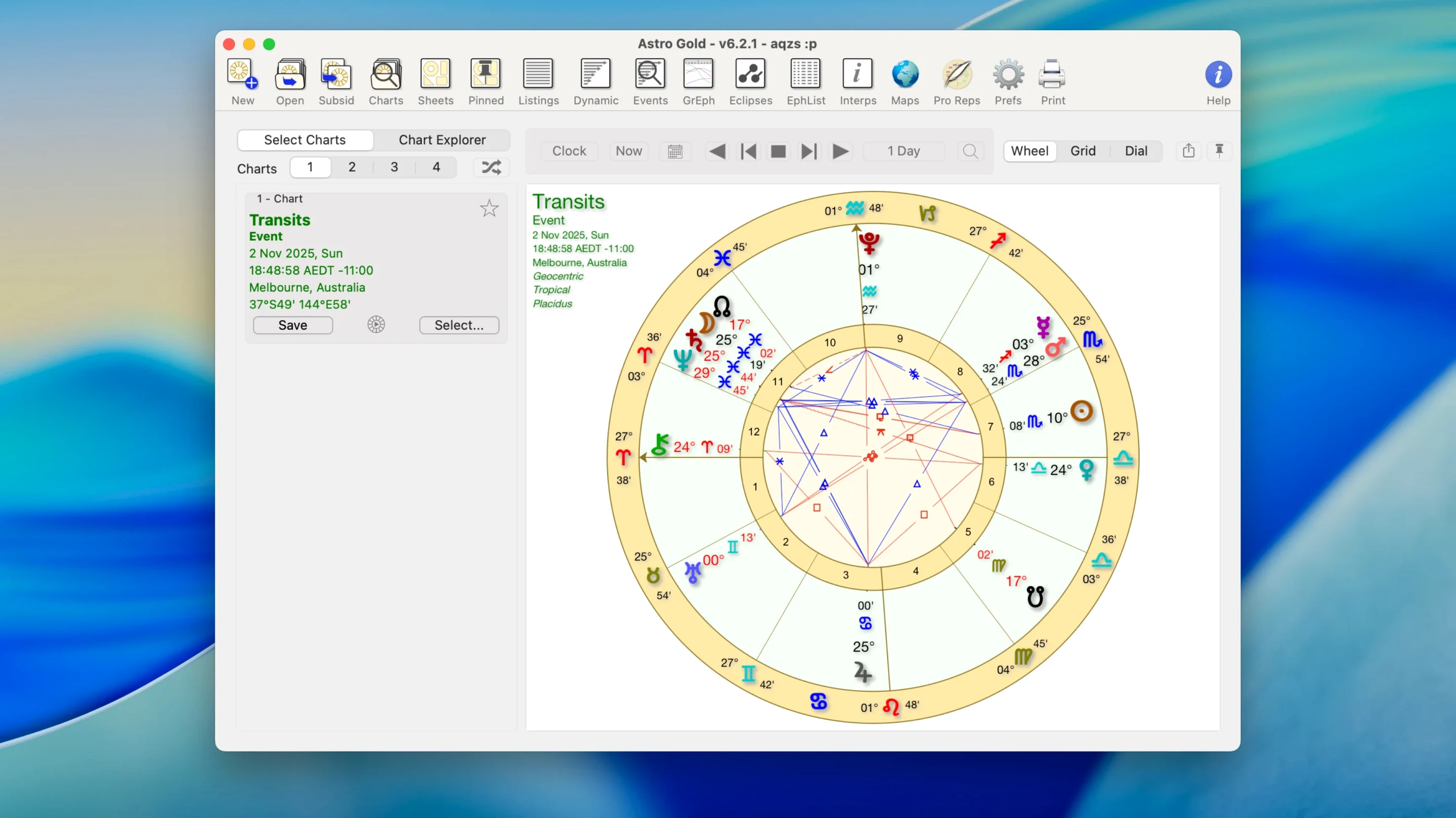
Astro Gold handles up to 108 harmonic charts without breaking stride. That raw capacity matters when you are laying out complex synastry or running a full set of progressions across a client database. The chart engine stays responsive — no beachballing while it recalculates.
Toggling between tropical and sidereal zodiacs is a single-click switch, and the same chart data can render with or without aspect lines. Experienced users will lean on the composite and Davison relationship charts for partnership work, pulling in asteroids like Chiron and Proserpina from a built-in ephemeris that goes well beyond the usual major bodies.
Astrocartography is not an afterthought here. The planetary lines plot cleanly on a scalable world map, letting you isolate a single planet or layer several for relocation analysis. Combined with solar arc and secondary progressions, you can track how a relocated chart unfolds across decades — not just the natal snapshot.
The interface is English only and runs on macOS 10.13 and later, on both Intel and Apple Silicon machines. No web-app compromises, no cloud dependency. Just a native Mac app built for astrologers who already know their way around a tri-wheel and want the tool to keep up.
Workflow: Relocation Analysis from Start to Finish
Most relocation questions land with a shortlist — three cities, maybe four. Here is how that plays out inside Astro Gold 6.2.1.
- Open the natal chart. Confirm the birth data is correct, then switch the zodiac to sidereal if the client works in Vedic. Astro Gold remembers your preference per chart, so you are not resetting it each session.
- Create a relocation chart for the first city. The app pulls coordinates from its internal atlas. A single click generates the new house cusps — same birth moment, different latitude and longitude.
- Layer transits onto the relocated chart. Set the date range to the proposed move window. Filter aspects to only the angular houses and the Moon. Tighten orbs to 2° for sharper timing.
- Open astrocartography. Toggle on Jupiter, Saturn, and the Sun. Pan the map to the target region. Look for a Jupiter MC line crossing within roughly 100 km of the city — that is a strong vocational indicator.
- Run a solar return for the relocation coordinates. Compare the rising sign and house placements against the natal. A shift in the return Ascendant often flags the practical difference between two shortlisted cities.
- Repeat for the remaining locations. Toggle between the three charts in the multi-window layout. Astro Gold handles the memory load without a hiccup — I have cycled through eight relocation charts in one sitting with no lag on an M1 Mac.
The whole sequence takes under ten minutes once the data is in. The bottleneck is interpretation, not the software.
Near-Instant Launch With Barely a CPU Blip
Astro Gold is a lightweight native app, not an Electron wrapper, and it shows. Launch is near-instant. Recalculating a tri-wheel with progressions, transits, and a relocated chart barely registers in Activity Monitor — typical CPU usage hovers around 2–4% during an active session on Apple Silicon. Memory footprint sits under 200 MB even with half a dozen charts open.
I have yet to see a crash during chart generation. The one area where you can introduce a pause is running high harmonic counts (above 60) on an older Intel Mac — the calculation thread will spike briefly, but the UI never locks. That is worth noting for anyone still on a 2017 MacBook Air.
No background processes linger after quitting. No auto-updater phoning home. Disk usage is modest: the app bundle plus its ephemeris files stays under 150 MB. For an astrology tool that packs fixed stars, asteroids, and a full astrocartography module, that is efficient packaging.
Composite and Astrocartography Gaps Beyond the Basics
Astro Gold vs. Time Nomad
Time Nomad is a capable free option and covers the basics well — natal charts, transits, a clean iOS-style interface. Where it falls short is depth. No composite charts, no Davison charts, no astrocartography, and no harmonic charting beyond a handful of presets. Astro Gold is the tool you graduate to when you need relationship charts or relocation mapping. Time Nomad suits a beginner; Astro Gold suits someone billing for readings.
Astro Gold vs. Solar Fire
Solar Fire is the Windows heavyweight with decades of feature accumulation. On Mac it runs via emulation or a virtual machine — it is not native. The macOS experience is clunky: font scaling issues, odd menu behaviour, and no Apple Silicon optimization. Astro Gold gives you perhaps 80% of Solar Fire's charting power in a clean, native package that respects Mac conventions. For most consulting astrologers on macOS, the trade-off favours Astro Gold.
Astro Gold vs. Io Edition
Io Edition is specialized — deep Hellenistic and medieval techniques, lots of text-based chart output, and a learning curve that assumes you already read Greek terms. Astro Gold covers medieval methods (terms, triplicities, dignities) without burying you in obscure menus. Io Edition suits academic researchers; Astro Gold suits a working practice where you need to move fast between chart types.
- macOS 10.13 or later
- Runs on Intel and Apple Silicon Macs
- Interface: English
Comments 0
Sign in to leave a comment.Sign inCreate an account
No comments yet. If a step is still there after you install it, say so.
More in Mac Apps
All in Mac Apps attn LED
Flashes the camera LED instead of popping a banner for important notifications.
4 steps saved
 Audio Hijack
Captures any audio your Mac plays and applies a denoise filter before it saves.
20 steps saved
 Audiobook Builder
Stitches a stack of audio files into one structured, chaptered audiobook.
7 steps saved
 Audiofile Engineering Fidelia
Plays a local music library with audiophile-grade output and per-device settings.
4 steps saved
 BAO Mask Avenger
Exposes every mask point as an animatable keyframe for detailed rotoscoping.
16 steps saved
 Bartender
Hides the menu bar icons you rarely need behind a single click.
5 steps saved
 BBEdit
Opens massive plain-text files and lets you edit them without a lag spike.
14 steps saved
 Beauty Box Photo
Smooths skin texture automatically while keeping eyes and hair sharp.