
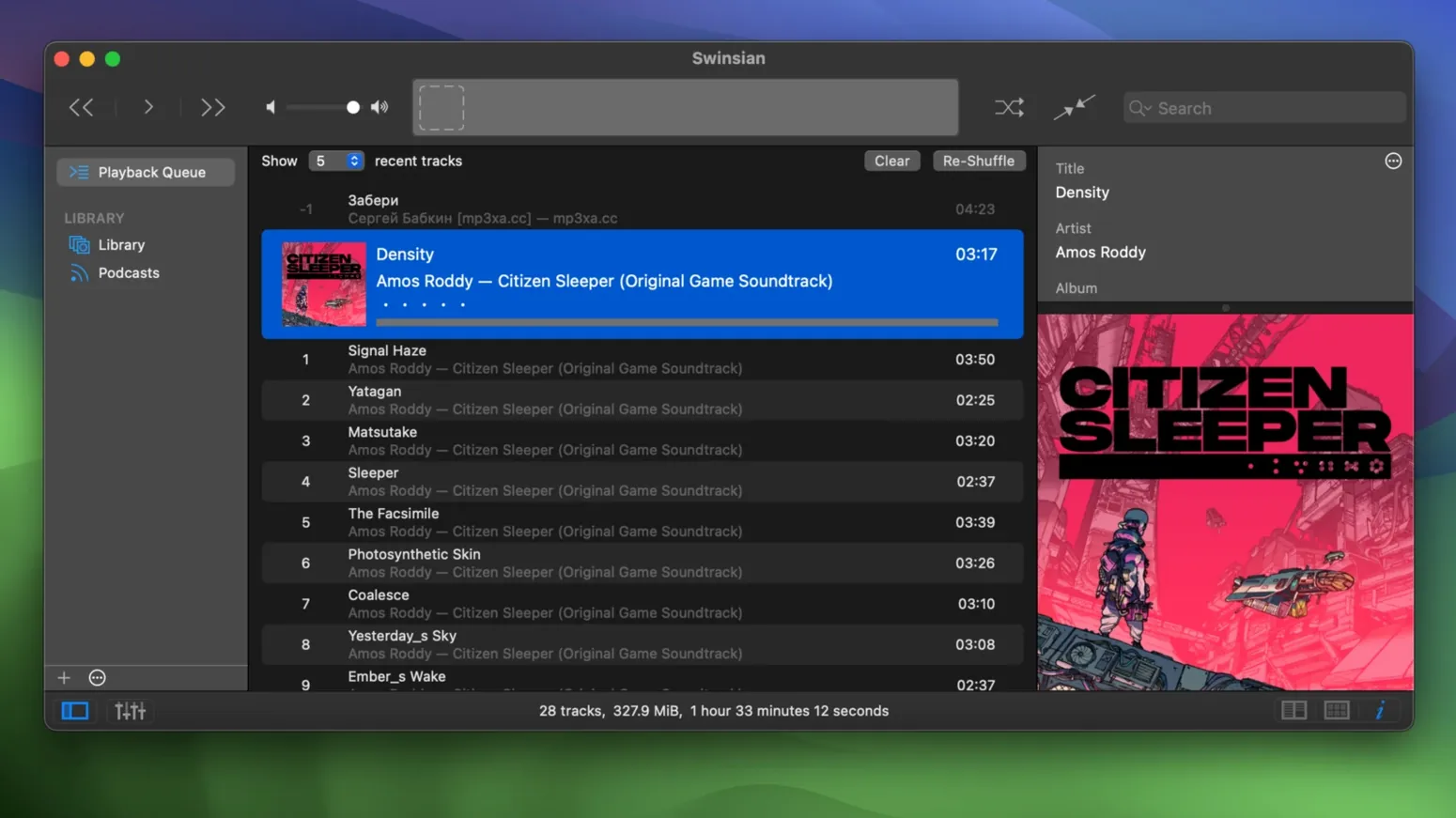
Swinsian 3 arrived as a quiet overhaul, and version 3.0.8 refines that foundation with better accessibility and a handful of structural fixes. The update makes the interface more flexible for high-resolution displays and corrects specific playback hiccups that affected niche formats. Underneath, the same focused ethos remains: this is a desktop music player built for people who manage files, not streams.
- Customize art grid labels with new display options.
- Scale interface text larger via hidden preference commands.
- Folder watching that auto-imports newly added tracks.
- Playback of quadraphonic FLAC files now works correctly.
- Transcoding rule presets save and apply as expected.
- Full cue sheet parsing for single-file album rips.
The 10-band and 31-band equalizer, AirPlay output, and separate playlist windows remain core to the experience. Swinsian also continues to handle Last.fm scrobbling, podcast downloads, and AppleScript automation. It’s a tool for a local library, and that’s precisely what it stays.
Set a watch folder before you drag files in
A fresh Swinsian library often inherits bad habits from whoever set it up. Three patterns show up repeatedly.
- Dragging in files before setting a watch folder. Point Swinsian at your music directory first, then let folder watching pull everything in. Manual imports can leave orphans when you reorganize folders later.
- Ignoring the tag editor's regular-expression power. Find-and-replace with regex handles mass cleanup that clicking through thousands of tracks never will. Learn one expression and fix an entire genre field in seconds.
- Skipping the duplicate scanner until the library is a mess. Run it early. Swinsian's duplicate detection catches near-matches, not just exact file copies, which saves hours of manual pruning later.
Enable automatic sample rate switching for your DAC
The defaults are sensible, but a short list of adjustments pays off immediately. Open Preferences before you play a single track.
- Sample rate switching. Under Playback, enable automatic sample rate switching. Without it, your DAC stays locked at one rate and hi-res files get resampled by macOS. This single toggle determines whether FLAC at 96 kHz actually reaches your interface at 96 kHz.
- Art grid label fields. Version 3.0.8 added more customization here. Set labels to show album, year, and format so you can spot a lossy copy hiding in a lossless library at a glance.
- Interface text scaling. The hidden option for larger text lives in the Terminal. A quick
defaults writecommand makes track lists readable on a 5K display without squinting. - Smart playlist criteria. Set up one smart playlist that catches tracks with missing artwork and another for files below 256 kbps. They become your cleanup queue.
Fix malformed cue files to split tracks properly
Cue sheets not splitting. Swinsian reads embedded cues, but a malformed cue file—wrong file reference, mismatched encoding—produces a single long track. Open the cue in a text editor and verify the FILE line points to the exact filename in the same folder. UTF-8 without BOM resolves most encoding glitches.
Transcoding rules disappearing. The 3.0.8 fix addressed this, but if you still lose a rule set, the preferences file may be locked. Check ~/Library/Preferences/com.swinsian.Swinsian.plist for restrictive permissions. A reset and re-create of the rules sorts it.
Quadraphonic FLAC silence. Before 3.0.8, these files played as dead air. The fix is in the update, so anyone still running an older build hits a wall. The workaround was converting to multichannel ALAC, but updating removes the need entirely.
iPod playlist sync failures. When tracks refuse to remove from iPod playlists, the device's database has a stale index. A full sync—not an incremental one—rebuilds the table. The 3.0.8 patch corrected the software side; a clean sync finishes the job.
- macOS 10.13 or later
- Apple Silicon or Intel 64-bit Mac
Questions I get before install
Can Swinsian watch folders for new music automatically?
Yes, Swinsian supports folder watching. Point it at a directory and it imports new tracks as they appear, keeping the library in sync with your file system.
Comments 0
Sign in to leave a comment.Sign inCreate an account
No comments yet. If a step is still there after you install it, say so.
More in Mac Apps
All in Mac Apps Swish
Snaps windows and switches spaces with gestures on a Magic Trackpad or Magic Mouse.
17 steps saved
 SwitchResX
Unlocks hidden screen resolutions and saves complete monitor configurations per setup.
21 steps saved
 SuperDuper!
Creates a full, bootable clone of your entire drive on any modern Mac.
14 steps saved
 Updated
Super Vectorizer Pro
Converts a flat raster logo into a scalable vector for print or CNC work.
12 steps saved
 TablePlus
Connects to PostgreSQL and MySQL in separate tabs to run queries side by side before a deploy.
6 steps saved
 Tahoe Cache Cleaner
Clears caches, logs and temporary files to free space and fix glitches.
17 steps saved
 Sublime Text
Edits code and text fast with multiple cursors and instant project search.
23 steps saved
 Studio One
Records, arranges and mixes music in a fast drag-and-drop DAW.