
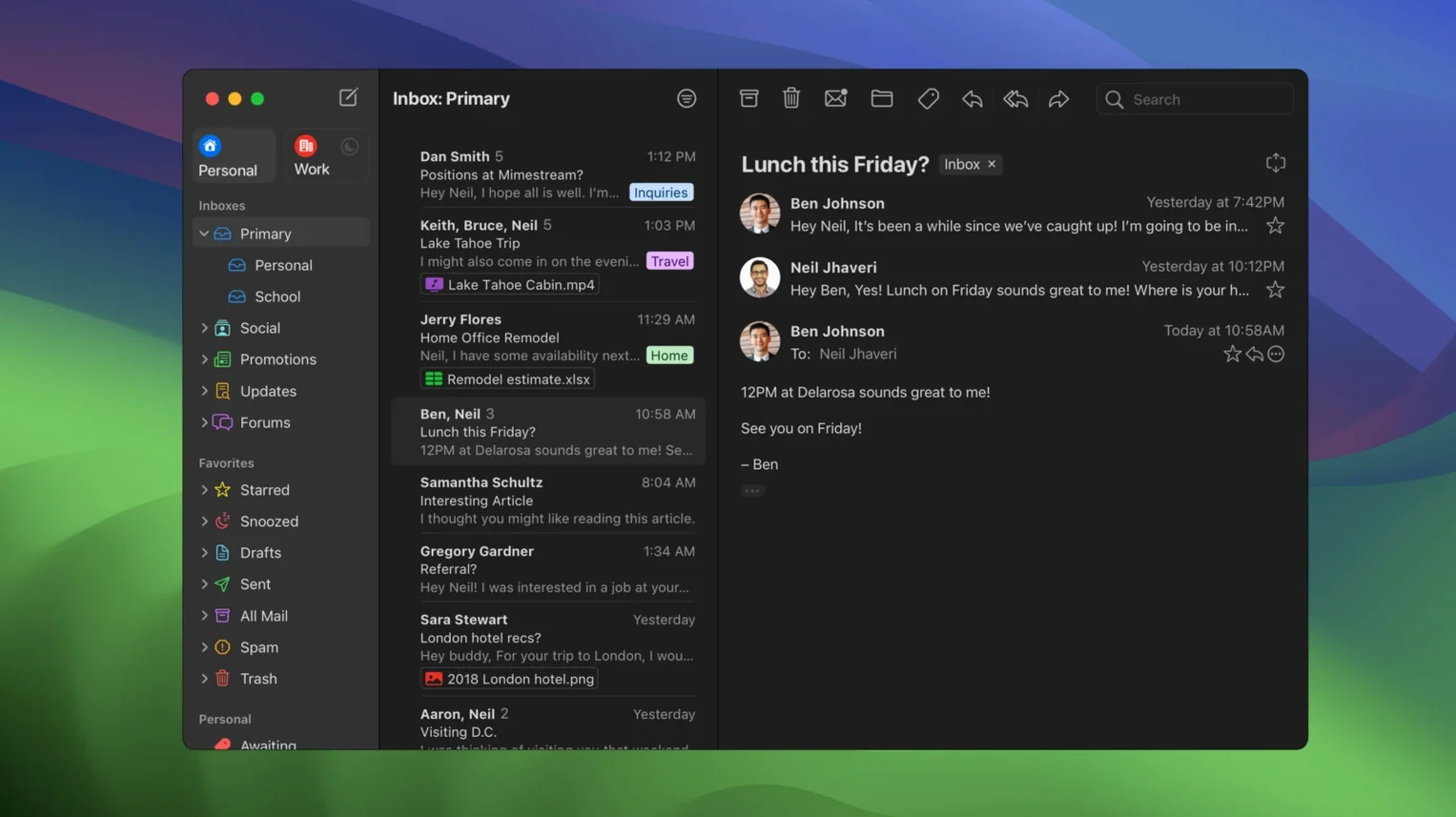
You sit down at your Mac, and instead of keeping a browser tab pinned for Gmail, you open a lightweight app that feels like it belongs on the desktop. That is the core experience of Mimestream. It uses the Gmail API rather than old IMAP protocols, which means your labels, signatures, and search syntax work right away. Here is what people commonly ask about before they install it.
- Is there a free version? You can evaluate the full app before committing.
- Can I search without an internet connection? Yes, Mimestream caches recent messages on disk and supports offline search.
- What macOS version do I need? Your Mac must be running macOS 12 Monterey or a newer release.
- Does it handle tracking pixels? It blocks tracking pixels from more than 50 known tracking services automatically.
- Which keyboard shortcuts work? You can choose between a Gmail-style shortcut set and an Apple Mail-style set.
The app is written in Swift and uses minimal disk space, storing only what it needs for fast, native performance. It delivers system notifications and syncs Gmail signatures without extra configuration.
Skipping the browser with a unified inbox and keyboard scan
You sit down with a coffee, launch Mimestream, and skip the browser entirely. The app opens to your unified inbox. Three new messages since last night.
- Scan the list. You use the down-arrow key to move through the unread messages. The preview pane keeps up instantly — no waiting for a web interface to catch up.
- Swipe to archive. A newsletter you meant to cancel. Two-finger swipe left on the trackpad, and it disappears into the archive. The gesture feels like clearing a notification on your phone.
- Label and file. A client update lands in your primary inbox. You tap
lto open the label picker, type "project-pine", and press return. The conversation gets the label and stays out of the inbox — no dragging, no drop-down menus. - Search with Gmail syntax. You need an old thread about the Q3 budget. You type
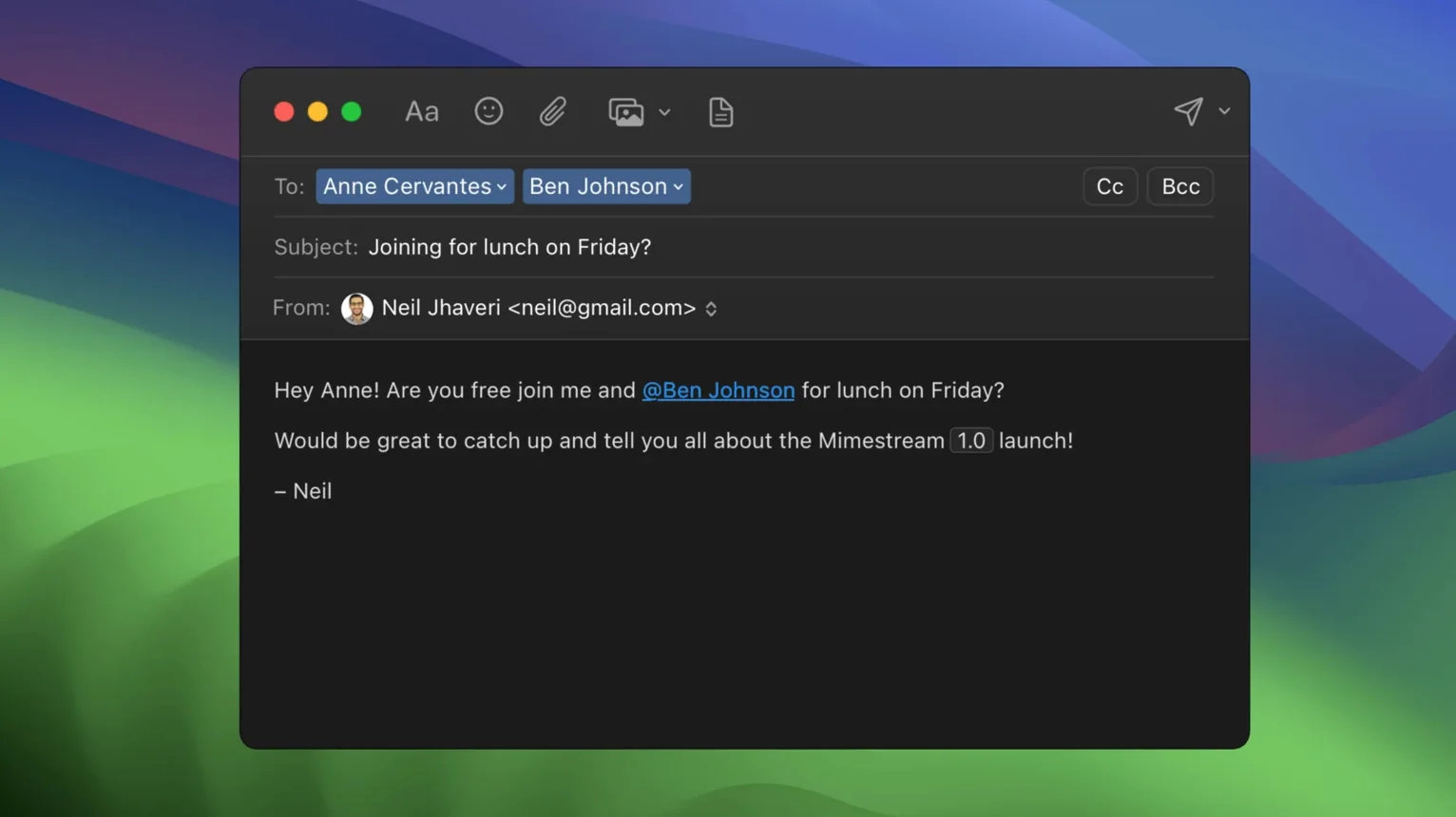
from:finance label:budget Q3into the search field. Results appear from the local cache before the network round-trip completes. The thread opens in under a second. - Compose and send. You hit
cto compose, type the recipient, and your synced Gmail signature populates automatically. The alias dropdown shows your work address and your personal one — both pulled from Gmail with zero setup. - Close and move on. You press
Cmd-Wto close the window. The app stays quietly in the background, delivering push notifications for new replies.
Managing five aliases without signing in and out
Consider a freelance brand strategist who juggles three client accounts and two personal Gmail addresses. In a browser, she would sign in and out of profiles, or forward everything into one inbox and lose track of which alias received what. Mimestream removes that friction.
All five aliases appear in the compose window automatically. When she replies to a message sent to [email protected], the app selects that alias by default. Signatures switch to match. She never sends a pitch deck from the wrong address by accident.
During a day of back-to-back calls, she works offline on a train. Searching for "contract renewal" pulls up three threads cached from the previous sync. She drafts replies in the seat, and the app queues them to send when Wi-Fi returns. No tabs, no profile switcher, no refreshing a stalled browser page.
Native search that respects your Gmail query syntax
Gmail-heavy professionals who live in labels, filters, and search operators. If your workflow depends on in:inbox has:attachment queries, the native search bar respects that syntax without forcing you into a web client.
Keyboard-driven Mac users who memorise shortcut sets and resent touching a mouse. Switching between Gmail and Apple Mail shortcut layouts means the muscle memory from years of either system transfers intact.
Privacy-conscious readers who want tracking pixels blocked without installing a separate browser extension. The automatic blocking covers the major tracking services and requires no configuration.
Travelers and offline workers who need cached access to recent threads. The app stores enough locally to read, search, and compose while disconnected, then syncs cleanly when you reconnect.
It is not for someone with a mix of Outlook and iCloud accounts. But for a Mac user whose email life revolves around Gmail, the fit is immediate. You download Mimestream, grant account access, and your labels and signatures are simply there — no IMAP mapping, no import wizard.
- New — Private Push notifications, an optional All profile, addresses for unknown senders, and configurable notification actions.
- Changed — Private Push notifications are now enabled by default.
- macOS 12 Monterey or newer
- Google account
- Apple Silicon or Intel Mac
Comments 0
Sign in to leave a comment.Sign inCreate an account
No comments yet. If a step is still there after you install it, say so.
More in Mac Apps
All in Mac Apps Millumin
Maps projection surfaces onto real-world stages in minutes, not hours.
5 steps saved
 Moho Pro
Rigs 2D characters with bones and exports them straight to game engines.
18 steps saved
 Mole
Detects new builds for non-App Store apps and swaps them without fuss.
12 steps saved
 Motion
Builds animated 3D titles and composited effects for video editors.
12 steps saved
 MotionVFX mInfographics
Turns flat charts into animated, on-brand infographics inside Final Cut Pro.
7 steps saved
 MotionVFX mKBHD
Applies glitch transitions and modern overlays to fast-turnaround edits.
11 steps saved
 MotionVFX - mLowers Universal for FCP
Adds news-style lower thirds and social handles directly inside Final Cut Pro.
17 steps saved
 Mela
Collects recipes, scans printed pages, and plans meals without the clutter.