
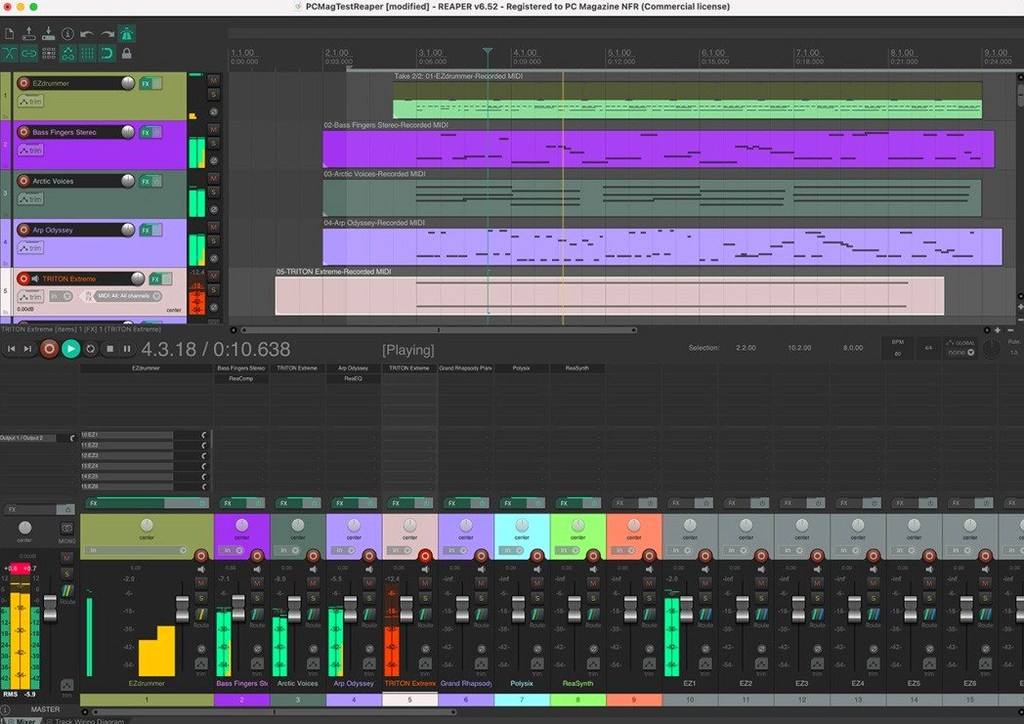
Right-click in an empty part of the track control panel and choose 'Insert virtual instrument on new track'. That one action wires up a soft synth, sets record monitoring, and arms the track — all in a single step. It is the kind of move that tells you REAPER was built by people who record.
Create a folder track next. Drag one track above another, click the folder icon on the parent, and the child audio routes automatically into it. Drop a compressor and EQ on the folder, and every drum mic inside inherits the processing. Record the folder's output to freeze the whole kit non-destructively — no bouncing, no printing effects you cannot undo.
Right-click the transport bar and switch the timebase to beats for production or time for a live band recording. The same version of REAPER handles a solo vocalist tracking at home and an orchestra session with 128 MIDI inputs, and it runs on Intel and Apple Silicon Macs from macOS 10.15 forward.
Open the Actions list and search for anything you do twice. Nearly every command can be scripted, chained, or bound to a key. Customization is not a side panel — it is the core of the app.
How REAPER Talks to the Rest of Your Setup
REAPER does not insist on its own ecosystem. It slots into a working studio without demanding you rebuild everything around it.
- Hardware routing — 512 channels of remappable I/O mean you can assign any physical input to any track directly. Patch a rack of outboard compressors into the Routing Matrix and treat hardware inserts like plug-ins.
- Loopback channels — another 512 virtual channels let you pipe audio between applications. Record a YouTube cue into a track, send a mix to OBS for a livestream, or capture system audio for a podcast without a separate loopback driver.
- MIDI devices — 128 hardware and loopback MIDI inputs and outputs. Connect a control surface, a synth module, an iPad running a sequencer, and REAPER sees them all simultaneously, each on its own port.
- Rewire and Rearoute — sync transport with Reason or Ableton Live running alongside, or stream audio between REAPER and another DAW via Rearoute. One machine, two apps, one clock.
- Video playback — import a video file, spot sound effects against picture on a dedicated video track, and output a QuickTime with the finished mix embedded. No roundtrip to a video editor for quick scoring or post work.
macOS integration runs deep without fanfare. Drag audio files from Finder onto the arrange view. Use Audio Unit, VST, and VST3 plug-ins side by side. REAPER respects Core Audio natively — aggregate devices, multi-channel interfaces, and hot-plugged hardware appear without restarting the app.
Three Groups Who Live Inside REAPER All Day
Not everyone needs 512 channels or a scripting engine. Three groups tend to live inside REAPER for hours a day:
Project studio owners recording bands, voiceover, or podcasts. They value the folder-track routing for drum kits and dialogue stems, the loopback audio for call-in guests, and the fact that one install runs on the studio Mac Pro and the MacBook Air they take to a remote session.
Sound designers and game audio engineers who handle hundreds of regions per session. The region manager, batch file rendering with wildcards, and custom actions let them output thousands of assets with consistent naming — a workflow that collapses when you have to name each file by hand.
Musicians who build songs alone with soft synths, samples, and a MIDI controller. Right-click virtual instrument insertion, automatic routing, and non-destructive freeze on folder tracks keep the creative flow going. They stop when the idea fades, not when the CPU spikes.
How Other DAWs Approach the Same Space
Logic Pro ships with a large library of instruments and loops. It favours a linear, region-based workflow with a polished single-window interface. Where REAPER exposes routing and customization openly, Logic Pro wraps the same capabilities in a more structured design. The trade: Logic's bundled content and Drummer track versus REAPER's track-type-free architecture and no imposed signal path.
Ableton Live treats the timeline and the clip launcher as equal partners. Its session view makes it the default for live performance and rapid idea capture. REAPER has no native session view equivalent; its strength runs the other direction — deep linear editing, comping, and post-production that Live handles less naturally.
Pro Tools anchors facilities that exchange sessions between studios. Its track types, bus structure, and editing tools are purpose-built for large tracking and mixing workflows. REAPER competes on flexibility: the same installation adapts to a mastering chain, a live input monitor, or a batch renderer without added toolkits.
The common thread: REAPER trades a curated out-of-box experience for an unbundled one that expects you to shape it. Users who enjoy that trade often find they stop looking for a reaper daw torrent and stick with the one app that does not box them into a single way of working.
- macOS 10.15 or later
- Intel or Apple Silicon Mac
Comments 0
Sign in to leave a comment.Sign inCreate an account
No comments yet. If a step is still there after you install it, say so.
More in Mac Apps
All in Mac Apps CloudMounter
Mounts cloud drives in Finder so you work without a separate client.
9 steps saved
 Cocktail Sequoia Edition
Runs maintenance scripts, cache cleanup and repairs from one control panel.
5 steps saved
 Coherence X
Isolates each web tool into its own app so one crash stops nothing.
21 steps saved
 Clop Pro
Hands back a compressed copy the moment you copy an image or video.
7 steps saved
 Color Finale
Lets you grade inside the Final Cut Pro timeline with no roundtripping.
13 steps saved
 Clip Studio Paint
Draws comics, manga and illustrations with pen tools built for line art.
21 steps saved
 Commander One PRO
Unzips, connects to FTP, and searches files inside one dual-pane window.
12 steps saved
 Updated
CleanShot X
Captures, annotates, and pins a window without leaving your screen.