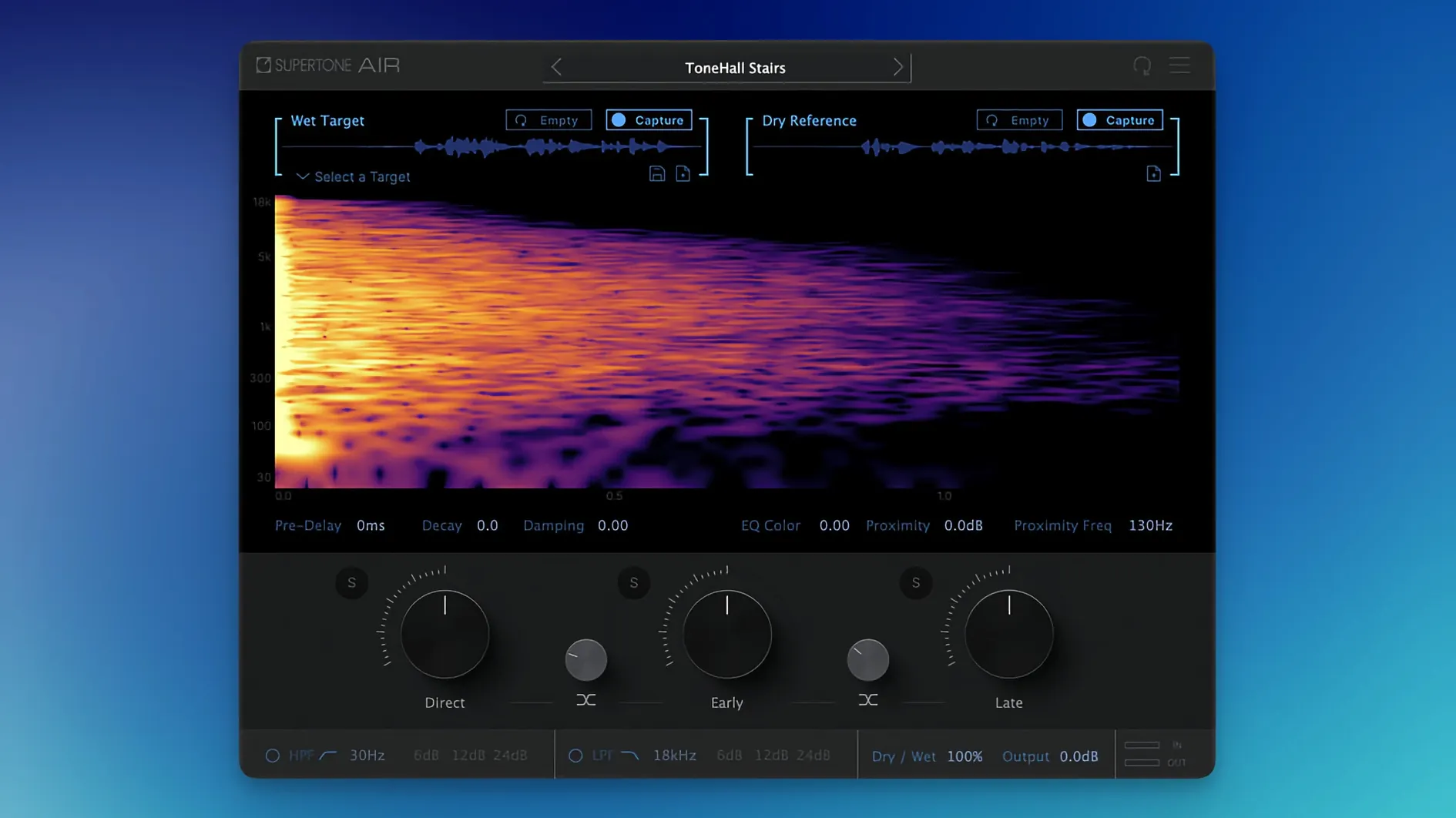
ADR sessions often stall on one stubborn task: making a studio booth recording sound like the original production track. Supertone Air removes that bottleneck. It analyses the acoustic fingerprint—reverb and EQ—of a reference clip and applies the same profile to dry dialogue in one pass.
Offline-only AudioSuite Processing in Pro Tools at Up to 96 kHz
Air runs as an AudioSuite-only plugin inside Pro Tools. It is built for offline processing, not real-time inserts, and supports 44.1 kHz, 48 kHz and 96 kHz sample rates. The installer serves both Intel and Apple Silicon Macs and requires macOS 10.13 or later. Captured spaces can be exported as WAV files for reuse across sessions. The interface is English only.
What the matching actually controls
The plugin reads reverb decay, damping and proximity cues from the source, along with its EQ contour, and maps them onto the target clip. Controls for decay, damping and proximity stay exposed so you can tighten or loosen the match without re-capturing. The result is a dialogue stem that sits against production audio without the usual booth ambience telltales.
Proximity Control to Shift Voice Depth Before Rendering
Open Air on a short dialogue clip and capture a reference before adjusting anything else. The defaults are sensible, but three controls reward a quick tweak.
- Proximity — pulls the voice closer or pushes it deeper into the captured space. Start at 50% and nudge up only if the matched voice sounds recessed against the guide track.
- Damping — softens high-frequency reflections. Useful when the reference was recorded in a hard, bright room and the ADR was recorded close-miked with a large-diaphragm condenser. Drop damping by 10–15% to keep sibilants natural.
- Decay tail trim — shaves the very end of the reverb tail without changing the early reflections. In fast-paced dialogue, trimming 0.2–0.3 seconds stops the stem from bleeding across edit points.
Export the profile once you are happy. Saved Air profiles let you batch-match an entire reel without re-analysing the reference, and the exported WAV captures let you archive the space for a different session entirely.
Renamed Binary Fixes a Sound Particles Air Collision
The update to 1.0.1 [GUISEPPE] addressed a file-name conflict. The plug-in binary was renamed from Air to Supertone Air, which resolved an installation collision for anyone who also had Sound Particles Air on the same system. The matching engine and control set were unchanged. Users who stayed on the initial release only notice the difference when installing fresh or updating alongside other Air-branded plug-ins.
Spectral EQ vs. Ambience Blend Across Three Dialogue-Matching Tools
Three tools cover roughly the same brief, each with a different emphasis.
- Accentize Chameleon — builds a spectral EQ curve and an ambience match from a reference, then lets you blend them. It works as a real-time insert and an AudioSuite processor. Chameleon gives more surgical control over the EQ side; Air keeps reverb and EQ inside one capture step rather than two separate analysis passes.
- iZotope Dialogue Match — part of RX Advanced, it matches EQ, reverb and ambience across clips. Its strength is the tight integration with the RX ecosystem. Air is lighter to operate and does not require the full RX suite, which matters on a lean Pro Tools rig.
- Zynaptiq UNVEIL — attenuates or boosts reverb without a reference track. It is not a matching tool by design, but engineers often reach for it in the same ADR sessions. Air replaces the manual guesswork of dialling reverb reduction by ear with a capture-and-apply model.
Air earns its spot when the daily task is straightforward: capture the production space, apply it to dry dialogue, and move on. If you frequently download a supertone air installer to test on a clean Mac, the current build installs without the old naming collision. Engineers who keep a supertone clear mac library of captured spaces often pair them across episodes of the same series, cutting matching time further.
- New — Plugin file renamed from Air to Supertone Air.
- Fixed — Installation conflict resolved for users who had Sound Particles Air previously installed.
- macOS 10.13 or later
- Apple Silicon or Intel processor
- Pro Tools (AudioSuite)
- Sample rates: 44.1 kHz, 48 kHz, 96 kHz
Questions I get before install
Does Supertone Air work in real-time on a track insert?
No. Air is designed for offline AudioSuite processing in Pro Tools and does not operate as a real-time insert plugin.
Can I save a captured reverb profile for later sessions?
Yes, you can export captured spaces as WAV files and reuse them in other projects.
Comments 0
Sign in to leave a comment.Sign inCreate an account
No comments yet. If a step is still there after you install it, say so.
More in VST Plugins
All in VST Plugins Superior Drummer
Gives you a 230 GB sample library of raw, unprocessed drum recordings inside any major DAW.
20 steps saved
 Strymon Plugin Bundle
Brings Strymon's delays, reverbs and modulation pedals into your DAW.
13 steps saved
 Synapse Audio The Legend HZ v2.0.2.R1
Recreates a classic analog monosynth with a fat, warm bass and lead tone.
4 steps saved
 T-RackS
Shapes a full album's final tone with a drag-and-drop chain of mastering modules.
21 steps saved
 Steinberg SpectraLayers Pro
Treats audio as a visual spectrum where every sound becomes a shape you can select and remove.
12 steps saved
 Spire
Builds big leads, pads and plucks from a flexible polyphonic synth.
8 steps saved
 Sonic Academy KICK
Sculpts the transient, body, and sub layer of a kick drum independently.
7 steps saved
 Slate Digital Submerge
Creates tempo-synced ducking and pumping without routing a sidechain compressor.